If you import products from AliExpress, Amazon, or a dropshipping app and your listings get disapproved on Google Shopping — or your whole Merchant Center account gets suspended before you've even made a sale — you are not alone, and you are almost certainly misdiagnosing the problem.
The most common belief is that Google has blacklisted AliExpress, or that "dropshipping is finally dead." Neither is true. Dropshipping is not against Google Merchant Center policy. Reselling and third-party fulfillment are explicitly allowed. The dropshipping space just gets heavier scrutiny because so many stores are thin, copy-paste clones of each other. The real trigger for disapproval is almost never the supplier — it's the lack of differentiation and missing trust signals in what you imported.
Here's exactly how to import supplier products into Shopify so they pass review, based on current (2025–2026) Google policy.
Why your imported products get disapproved (when competitors don't)
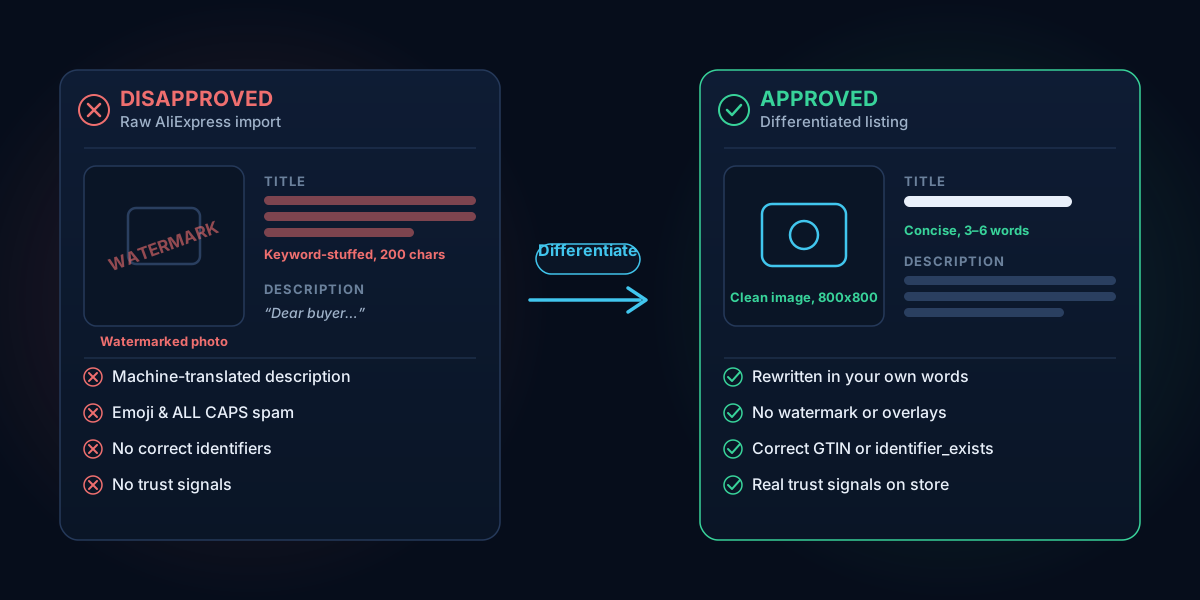
A frequent frustration: a competitor ranks in Google Shopping with the "exact same product description, really long title, and same product photos" — yet your identical listing gets rejected. Two things are happening.
First, the competitor likely got indexed earlier or has more accumulated trust on their domain. Second, and more importantly, Google's quality systems flag duplicate, low-effort content — and you may simply be the one who tripped the threshold. Raw AliExpress data is the worst offender: keyword-stuffed titles, machine-translated descriptions full of "Dear buyer," emoji, and ALL CAPS. Google associates excessively capitalized text with spam and "fishy retailers."
So the fix isn't to find a supplier Google likes. It's to make every listing your own.
Step 1: Rewrite every title and description before you publish
Never publish imported text as-is. Treat the supplier data as raw material, not a finished listing.
- Titles: Keep them concise — roughly 3 to 6 words — leading with the primary keyword plus one real differentiator (brand, material, size, or use case). Drop the 200-character keyword-stuffed string.
- Descriptions: Rewrite in your own words. Remove "Dear buyer," emoji, random capitalization, and machine-translation artifacts. Describe the actual product, who it's for, and what's in the box.
- Tone: No fake urgency, no ALL CAPS, no promotional spam language.
This single step prevents the majority of "duplicate content" and low-quality disapprovals. Rewriting dozens of listings by hand is tedious, which is exactly why product-import tools exist — more on that below.
Step 2: Fix your product images
Image rules are strict and specific. Google requires "an image with an unobstructed view of the product," and images with promotional text (retailer logos, calls to action) or watermarks are "disapproved and remain disapproved until their images are updated." That's the core reason raw AliExpress photos fail — supplier images are frequently watermarked or plastered with badges.
- Use clean images with no watermarks, logos, or promotional overlays.
- Don't use generic or placeholder images as your main image.
- Aim for at least 800x800px (Google's hard minimums are 100x100 for non-apparel and 250x250 for apparel, but bigger is better).
One nuance: some merchants have observed promotional badges like "20% OFF" staying live without disapproval in 2025. That's observed enforcement behavior, not a policy change. The written policy still prohibits overlays and watermarks — do not build your store on the assumption that they're allowed.
Step 3: Handle GTINs correctly (this is widely misunderstood)
A persistent myth is that missing a GTIN auto-bans your products. It doesn't. As of 2025, products missing a GTIN are no longer automatically disapproved and can still serve. GTIN is "strongly recommended" for products that have one assigned by the manufacturer — and listings with correct identifiers get higher priority and visibility — but it is not universally required.
What does cause disapproval is a wrong or fabricated GTIN. Never invent a code to pass a check.
- If a product genuinely has a manufacturer GTIN, use the real one.
- For custom, unbranded, or generic AliExpress goods with no GTIN, set
identifier_existsto "no" (or use your store name as the brand plus a unique MPN). Don't fake it.
Step 4: Fix duplicate variant errors
If you import a product with size/color variants, each variant must carry a unique distinguishing attribute — color, size, material, or condition — while sharing the same item_group_id. When variants share a group ID but have no distinguishing value, Google sees the same product submitted repeatedly and throws a duplicate error. Make sure your variant attributes are actually populated, not blank.
Step 5: Build real trust signals on your store
This is what keeps you out of the worst category of all: a Misrepresentation suspension. Misrepresentation is treated as an "egregious" violation, which means — per Google's policy — "your Google accounts will be suspended upon detection and without prior warning." This is why a dropshipper can be suspended instantly with no products live: a hastily-built store with no trust signals reads as untrustworthy on its own.
Misrepresentation covers hiding or falsifying business info, offering products "you don't have or can't deliver," inadequate contact info, and missing return/refund or pricing disclosures. To stay clear of it, your live store needs:
- A genuine About page describing the real business.
- Working contact details — practitioner consensus and Google guidance point to at least two of: physical address, phone, email (commonly placed in the footer).
- Clear shipping, return/refund, and privacy policy pages.
- Business information in Merchant Center that matches your live store exactly — mismatched domains and feed-to-site inconsistencies are common errors after importing or migrating.
Because Google's suspension notices are deliberately vague — "they do not give detailed explanations that help us find and solve the problem" — the smart move is to fix all likely triggers before you request a review, not one at a time.
You don't have to guess which trust signals are missing. Run a free scan of your store at shopflixai.com and it will check your store against the same categories Google reviews — policy pages, contact and trust signals, product feed, images, and misrepresentation flags — and tell you precisely what to fix.
Step 6: Understand the timeline so you don't panic
Knowing the enforcement timeline prevents bad decisions:
- Data-quality issues (non-egregious): Google emails a warning with a fixed timeframe — commonly cited as 7 or 28 days — during which your products keep showing. You get one courtesy review in that window. If it's unresolved at the deadline, the account is suspended.
- Egregious issues (like misrepresentation): No warning. Suspended on detection.
- Reviews take roughly 3–7 business days. Repeated failed re-reviews can trigger an extended cool-down that disables the review button — so don't appeal until your store is genuinely clean.
- After you fix product data, Google's refresh takes about 3–5 business days (image and feed changes roughly 24–72 hours) before disapprovals clear. Don't assume your fix failed just because it didn't update overnight.
If you were suspended in error, submit a thorough, honest appeal — Google reinstates accounts only "in compelling circumstances." And critically: do not delete the suspended account and open a new one for the same business. That's a fast path to a permanent ban.
Do it cleanly from the start
The merchants who never get disapproved aren't using a secret supplier. They import, then differentiate: rewritten titles, original descriptions, clean images, correct identifiers, and a store with real policies and contact info.
That's the workflow ShopFlix AI is built for. It imports products from suppliers and rewrites titles and descriptions into unique, SEO-optimized, GMC-compliant copy automatically — instead of you editing hundreds of listings by hand. It then continuously monitors your store and auto-fixes the compliance gaps that cause disapprovals. Install ShopFlix AI from the Shopify App Store to import clean and stay compliant.
Frequently asked questions
Is dropshipping from AliExpress or Amazon against Google Merchant Center policy?
No. Google's Shopping policies do not prohibit reselling or third-party fulfillment. Dropshipping stores simply face more scrutiny because the category is full of thin, copy-paste sites. The disapproval driver is lack of differentiation and missing trust signals, not the supplier you use.
Why does Google disapprove my products even though competitors sell the identical item?
Usually because your listing is duplicate, low-effort content and you tripped the quality threshold — while the competitor got indexed earlier or has more domain trust. Raw supplier titles, machine-translated descriptions, and watermarked photos are the usual culprits. Rewrite the text and replace the images and the disapproval typically clears.
Do I need a GTIN to list dropshipped products, and what do I do when AliExpress doesn't provide one?
You don't strictly need one — as of 2025, missing GTINs no longer cause automatic disapproval, though correct identifiers improve visibility. When there's no manufacturer GTIN, set identifier_exists to "no" (or use your store name as brand plus a unique MPN). Never invent a GTIN; a wrong one will get you disapproved.
How do I rewrite an imported AliExpress title and description so it passes Google Shopping?
Cut the title to roughly 3–6 words led by the primary keyword plus one real differentiator. Rewrite the description in your own words, removing "Dear buyer," emoji, ALL CAPS, and translation artifacts. The goal is unique, human-readable copy that describes the actual product — not the supplier's spam string.
Why are my product images getting disapproved, and how do I fix watermarked or generic supplier photos?
Google requires an unobstructed view of the product and disapproves images with watermarks, logos, or promotional text — and they stay disapproved until updated. Generic or placeholder main images are also disapproved. Replace them with clean images (ideally 800x800px or larger) that have no overlays.
What triggers a Misrepresentation suspension, and can I get my account reinstated?
It's triggered by hidden or false business info, products you can't deliver, inadequate contact details, and missing return/refund or pricing disclosures. Because it's "egregious," it suspends without warning. You can appeal, but Google reinstates only in compelling circumstances — fix every trust gap first, then submit one honest, thorough appeal. Don't open a new account for the same business.
How long do I have to fix a warning before my Merchant Center account is suspended?
For non-egregious data-quality issues, Google emails a warning with a fixed window — commonly 7 or 28 days — and your products keep showing during it. You get one courtesy review. Egregious issues like misrepresentation skip the warning entirely and suspend on detection.
What's the difference between a single product disapproval and an account-level suspension?
A product disapproval removes one listing (or a batch) from Shopping while the rest of your account keeps running — usually fixed by editing that product's data. An account-level suspension takes your entire account offline and requires a review or appeal to restore. Misrepresentation and other egregious violations cause account-level suspensions; most data-quality problems cause product-level disapprovals.
Stop guessing why Google flagged your store
Run a free scan to see the exact issues Google checks for — then install the ShopFlix AI app to fix them automatically and stay approved.
0 Comments
No comments yet — share your experience or ask a question below.
Leave a comment