You launched a clean Shopify store, connected Google Merchant Center, and then the email arrived: account suspended for Misrepresentation. No product was mislabeled. Your prices matched. Yet Google decided your store looked less than trustworthy. For a huge number of Shopify merchants, the hidden trigger is boring but brutal: your business name, address and phone number don't match across your storefront, your policy pages, and your Merchant Center settings.
Google calls the trio NAP — Name, Address, Phone. When those signals disagree with each other, or when they simply aren't there, Google's automated reviewers can't confirm you're a real, accountable business. That uncertainty is exactly what the Misrepresentation and Insufficient Contact Information policies exist to catch. This guide shows you what "consistent" actually means to Google, where Shopify quietly introduces mismatches, and how to lock your identity down before a reviewer does it for you.
What NAP consistency means and why Google cares
NAP consistency means your legal business name, physical address, phone number (and, in practice, email) are the same everywhere a customer or a crawler can see them. Google's Merchant Center guidance is explicit: "Your legal business name, physical address, phone number, and email must be consistent across your website and Merchant Center account."
This maps directly onto two enforcement policies you need to respect:
- Insufficient Contact Information. Google requires that customers can "easily find" a way to reach you before checkout, and that you provide a verified phone number or physical business address inside Merchant Center. Since August 2021 the website side only requires one contact method — address, phone, email, contact form, or a social business profile — but the Merchant Center side still expects a verified phone or address, and the two shouldn't contradict each other.
- Misrepresentation. This is the heavyweight. Google's policy prohibits offers that "present a false identity, business name, or contact information" and that "make it seem like you're supported by another brand, organization, or government entity when you're not." Misrepresentation violations are treated as egregious and can trigger suspension without a prior warning.
The key mental shift: Google isn't only asking "is your contact info present?" It's asking "does your business identity hold together as a single, honest story?" A store whose name says one thing, whose address says another, and whose phone number belongs to nobody reads like a shell. That inconsistency, not any single missing field, is what gets accounts flagged.
Where Shopify stores leak inconsistent business details
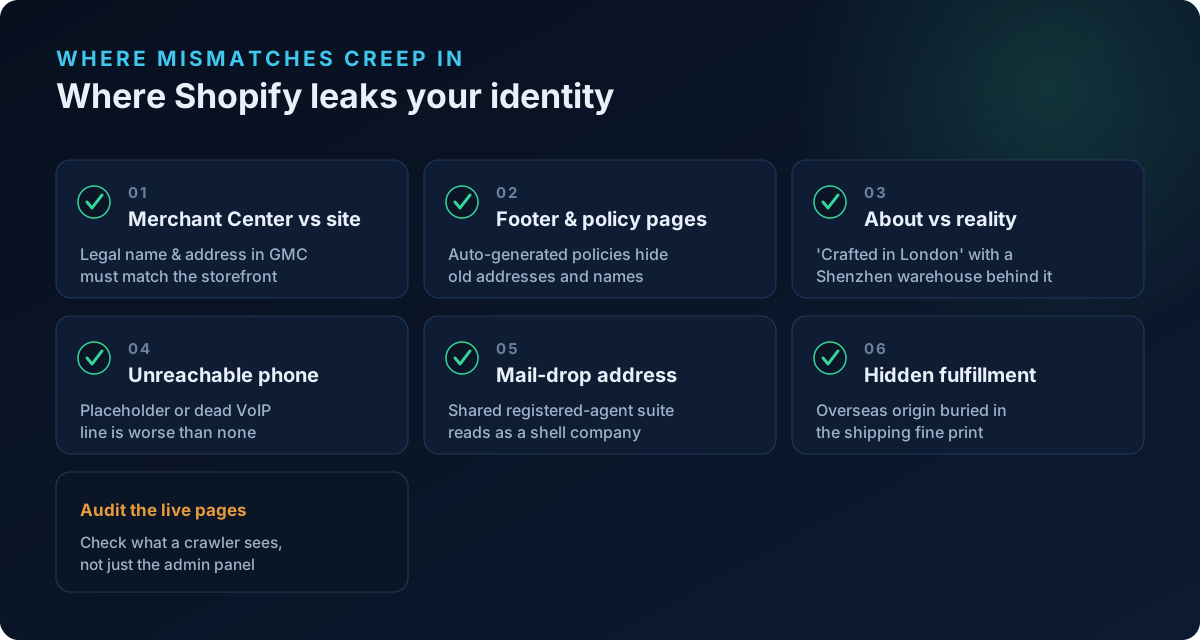
Most merchants never intend to misrepresent anything. The mismatches creep in because Shopify surfaces your identity in a dozen places that you edit at different times. Audit every one of these.
1. Merchant Center Business Information vs. your storefront
In Merchant Center, open Settings → Business information. The legal name and address there must match what appears on your site. A common failure: the Merchant Center name is your registered LLC ("Northbridge Commerce LLC") while the storefront brands everything as "LumaGlow." Neither is wrong on its own — but if the LLC name appears nowhere on the site, a reviewer can't connect the account to the store. Show both: brand prominently, legal entity in the footer or Terms.
2. Shopify footer, contact page, and policy pages
Shopify auto-generates Refund, Privacy, Terms, and Shipping policy pages from Settings → Policies. These often contain a different address or company name than your Contact page — especially if you copied a template or changed offices. Google reads your own legal pages, and contradictory statements across them are a documented misrepresentation signal. Every policy page, the contact page, and the footer should carry the same NAP block.
3. The "About" / brand story vs. reality
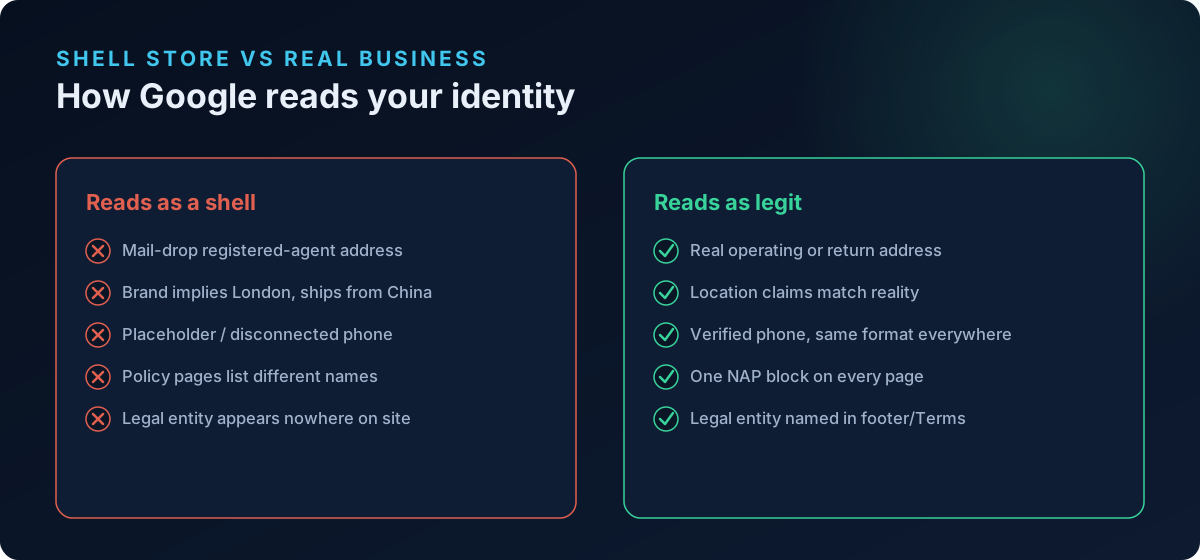
If your brand name or About page implies a location — "Crafted in London," "Designed in California" — but your address, phone country code, currency, and domain TLD all point elsewhere, that's brand-implied geography that doesn't match reality. Google's misrepresentation policy specifically targets making your business seem like something it isn't. Either substantiate the claim with a real matching address and local phone, or soften the copy to what's true (e.g. "a London-inspired label shipping worldwide from our warehouse in Shenzhen").
4. Phone numbers that don't belong to you
A phone field filled with a placeholder, a disconnected VoIP number, or a number that Google can't associate with your business is worse than no number. Merchant Center verifies phone numbers. Use a real, reachable line, list it in the same format everywhere (country code included), and make sure the Merchant Center Business Information phone matches the storefront one.
5. Registered-agent and "mail-drop" addresses
Here's the trap that page-presence checkers miss entirely. If your "address" is actually a mass-incorporation registered-agent address — Harvard Business Services in Delaware, CT Corporation, Registered Agents Inc, or a similar formation-service suite shared by thousands of shell companies — Google's reviewers recognize it. It signals that no real operation sits behind the storefront, and it pattern-matches to accounts that get suspended for misrepresentation. A registered agent is fine for legal filings; it is not a substitute for a genuine business or return address on your storefront.
6. Concealed fulfillment origin
Read your own Shipping policy. If the prose quietly admits "please allow 15–30 days as items ship from our overseas facility" while the rest of the site presents a domestic identity, that's Omission of relevant information — Google requires you to "clearly and conspicuously disclose all related conditions before and after purchase," including shipping. Hiding an overseas warehouse behind a local-looking brand is a classic misrepresentation pattern. Disclose the real fulfillment origin and realistic delivery windows up front.
The trust signals scanners usually miss
Most "GMC checker" tools verify that a policy page exists and that a phone number is present. That's necessary but nowhere near sufficient. The signals that actually drive Misrepresentation suspensions live one layer deeper — in the legitimacy of your identity, not its mere presence.
This is the gap the Trust & Identity layer in ShopFlix AI's Deep scan was built to close. Instead of only asking "is there an address?", it asks the questions a Google reviewer effectively asks:
- Is that address a registered-agent / mail-drop suite shared by mass-incorporated shells?
- Does the brand name imply a country that your address, phone, currency, and domain TLD don't back up?
- How old is the domain, and is WHOIS owner information masked behind privacy? Very new (under ~90 days) or fully anonymized domains draw heavier scrutiny.
- Does your shipping or terms prose admit an overseas fulfillment origin that the rest of the store hides?
- Does your NAP actually reconcile across storefront, contact page, legal pages, and Merchant Center — and does the brand name connect to a real legal entity?
- Do any of your own legal pages contradict each other?
None of those show up in a surface "you have a contact page" checkmark, yet each is a live suspension trigger. (If you're recovering from an active suspension, our walkthrough on how to fix a Google Merchant Center misrepresentation suspension covers the appeal side once your identity is clean.)
A step-by-step NAP cleanup for your Shopify store
Work through this in order. Fix identity before you appeal — a resubmission on top of unresolved mismatches usually fails.
- Write your canonical NAP block once. Decide the exact legal name, full physical address, phone (with country code), and support email you'll use. This is your single source of truth.
- Update Merchant Center. Settings → Business information. Enter the legal name, verified phone, and physical address. Complete any identity or business verification Google requests.
- Put a matching NAP block in your Shopify footer so it appears site-wide, on every page a crawler hits.
- Fix the Contact page. Show at least one reachable method (address, phone, email, or a working contact form) and make it match your canonical block.
- Reconcile all four policy pages. Refund, Privacy, Terms, Shipping — replace every stray old address or company name. Remove contradictions between pages.
- Reconcile brand vs. legal entity. If you trade under a brand, name the legal entity somewhere visible (footer or Terms) so the Merchant Center name has an on-site anchor.
- Kill implied-geography mismatches. Make location claims true, or rewrite them. Align currency and, where reasonable, phone country code with your stated market.
- Disclose fulfillment honestly. If you ship internationally, say so up front with realistic timelines.
- Replace mail-drop addresses. Use a genuine operating or return address on the storefront, not a shared formation-service suite.
- Re-crawl and confirm. View the live pages (not just the admin) and verify every instance of your name, address, and phone is byte-for-byte consistent.
Frequently asked questions
Does my Shopify store need a physical address to advertise on Google?
You need at least one contact method visible on your site before checkout — that can be a phone, email, contact form, or social business profile. Separately, Merchant Center requires a verified phone number or physical business address in your Business Information settings. Providing a real, consistent address is the safest option and reduces misrepresentation risk.
Can I use my home address or is that a privacy problem?
Many small merchants legitimately use a home address, and Google accepts it. If you'd rather not publish it, a real commercial address, a genuine office, or a mailbox you actually control works — but avoid shared registered-agent "mail-drop" suites, which Google associates with shell companies and heightened scrutiny.
My brand name is different from my registered company name. Is that a violation?
No. Trading under a brand while being incorporated under a different legal name is completely normal. The problem only arises when the legal entity appears nowhere on your site, so Google can't connect the Merchant Center account to the store. Show the brand prominently and list the legal entity in your footer or Terms.
Why was I suspended for Misrepresentation when all my product data is correct?
Misrepresentation isn't only about products — it covers your business identity and transparency. Inconsistent or missing NAP, an implied location you can't back up, a concealed overseas fulfillment origin, or contradictory policy pages can all trigger it even when every product field is accurate. Google treats these as serious violations that can suspend an account without a prior warning.
How consistent does the information really have to be?
Aim for exact matches: the same legal name spelling, the same address format, the same phone number with country code, across the storefront, contact page, all policy pages, and Merchant Center. Small discrepancies — a suite number on one page but not another, an old address left in the refund policy — are exactly the kind of thing automated reviewers flag.
How long does it take Google to re-review after I fix my NAP?
After you request a review in Merchant Center, Google typically re-evaluates within a few business days, though it can take longer. Fix every inconsistency before requesting the review; a repeat rejection on the same issues can lengthen the process and reduce your remaining appeal attempts.
Scan your store before Google does
Your identity either holds together as one honest story or it doesn't — and Google's reviewers decide that faster than you can appeal. Before you submit anything, run a free public scan at shopflixai.com to see your store the way a reviewer does, or install ShopFlix AI on the Shopify App Store to run the Deep scan's Trust & Identity checks — NAP reconciliation, mail-drop detection, implied-geography and fulfillment-origin audits — and fix the mismatches before they cost you your account.
Stop guessing why Google flagged your store
Run a free scan to see the exact issues Google checks for — then install the ShopFlix AI app to fix them automatically and stay approved.
0 Comments
No comments yet — share your experience or ask a question below.
Leave a comment