You uploaded your product feed, connected the Google & YouTube channel, and waited for traffic. Instead you got the email: account suspended for "Misrepresentation." No line item to fix, no product ID, no screenshot — just a link to a policy page and a cooldown clock. Or maybe your account is still live but half your catalog sits disapproved, quietly bleeding impressions while you try to guess which field Google objects to.
This is the most frustrating part of selling on Google Shopping in 2026: the platform tells you that you failed, almost never why. This checklist fixes that. Work through it top to bottom and you will have audited your store against the exact categories Google's automated and manual reviewers use — before a reviewer ever looks. Treat it as a pre-flight inspection, not a post-crash autopsy.
How Google actually enforces in 2026 (read this first)
Before the checklist, understand the two failure modes, because they need different responses.
- Product-level disapproval rejects individual listings. The rest of your catalog keeps serving. These are usually data-quality problems — a missing GTIN, a price mismatch, an image with promo text — and they show up per-product in Merchant Center.
- Account-level suspension halts every Shopping surface at once and requires a site-wide compliance review before reinstatement. These are almost always policy problems: Misrepresentation, Insufficient Contact Information, or Untrustworthy Promotions.
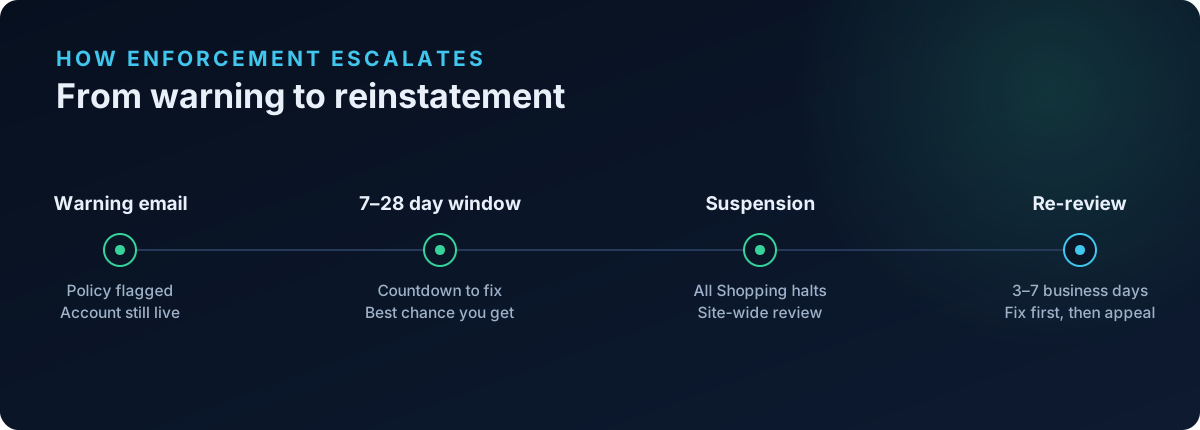
A critical nuance from Google's own enforcement documentation: most non-egregious violations get a warning email with a 7- or 28-day window to fix before suspension. Egregious violations are "suspended upon detection and without prior warning." So a warning is not a suspension — it is a countdown, and it is the best chance you will get. Don't waste it appealing; spend it fixing.
Google's October 28, 2025 Misrepresentation update tightened the screws further, extending scrutiny of pricing, free trials, and offers, and requiring merchants to clearly disclose all costs, payment terms, and trial conditions. If your store leans on urgency timers or "was/now" pricing, that section of this checklist matters more than it did a year ago.
Tier 1: Store fundamentals (the stuff that gets whole accounts suspended)
These are the account-level basics. Miss one and no amount of clean product data will save you.
Contact information — two methods minimum, and they must be visible
Google's contact information policy requires you to show your customers a genuine way to reach you. A lone "Contact Us" form is the single most common reason legitimate Shopify stores fail this check. Google wants at least two of the following, visible on your storefront (footer or a dedicated page):
- A physical business address.
- A phone number.
- An email address.
- A contact form.
- A linked social media business profile.
Concrete fixes for Shopify:
- Add your address and phone in Settings → Store details, then surface them in the footer or on a Contact page — entering them in admin alone is not enough; they must be rendered on the live site.
- Use a branded email on your own domain (support@yourbrand.com) rather than a raw Gmail address. It reads as more legitimate to both customers and reviewers.
- Make sure whatever you show matches your Merchant Center business information exactly.
Required policy pages, present and non-contradictory
Google needs to see that you disclose the terms of doing business. On Shopify, generate these under Settings → Policies:
- Refund/Return policy — with a real timeframe and process, not a placeholder.
- Shipping policy — with realistic delivery estimates.
- Terms of Service and Privacy Policy.
The trap here is not absence but contradiction. If your Shipping page promises "3–5 day US delivery" and your Terms of Service admits "please allow 2–3 weeks," that inconsistency is exactly the kind of thing that reads as misrepresentation. Read all four pages together and reconcile every claim.
Secure, functioning, complete checkout
Reviewers will attempt to reach checkout. Confirm HTTPS is enforced sitewide, that products can actually be added to cart and purchased, and that no page throws errors or shows "coming soon" placeholders. A store that can't be bought from can't be verified.
Tier 2: Product-feed data quality
Once the fundamentals pass, this is where per-product disapprovals live.
Unique product identifiers: GTIN, MPN, brand
Per Google's GTIN requirements, if a product has a manufacturer-assigned GTIN, you must submit it — omitting it can get the product disapproved, and submitting an invalid one can escalate to account suspension. The rules in plain terms:
- Products with a GTIN: submit the correct
gtinvalue. - Products without one (genuinely custom, handmade, or art pieces): you don't need a GTIN — but set
identifier_existstonoso Google knows the omission is intentional. - Always submit
brandfor products that have one; usempnwhere applicable.
Do not invent or reuse GTINs to silence the warning. A wrong GTIN is worse than a declared-missing one.
Price and availability consistency
The classic bait-and-switch flag: the price or stock status in your feed must match your live product page at the moment Google crawls it. Common Shopify culprits are currency-conversion apps that display one price to shoppers and another in the feed, and stale availability after a variant sells out. Audit that feed price == landing-page price == checkout price, in the same currency. (We go deeper on this in Shopify Google Merchant Center price and availability mismatch.)
Image compliance
Google's image rules are stricter than most merchants expect, and enforcement keeps tightening — note the minimum 500×500 px requirement arriving across all categories in January 2027. Disapproval triggers to check now:
- No promotional overlays — no "Sale," "Free shipping," watermarks, logos, or text baked into the image.
- No placeholder or "image coming soon" graphics.
- Images large enough, on a clean background, showing the actual product.
Tier 3: The Trust & Identity layer (what page-presence scanners miss)
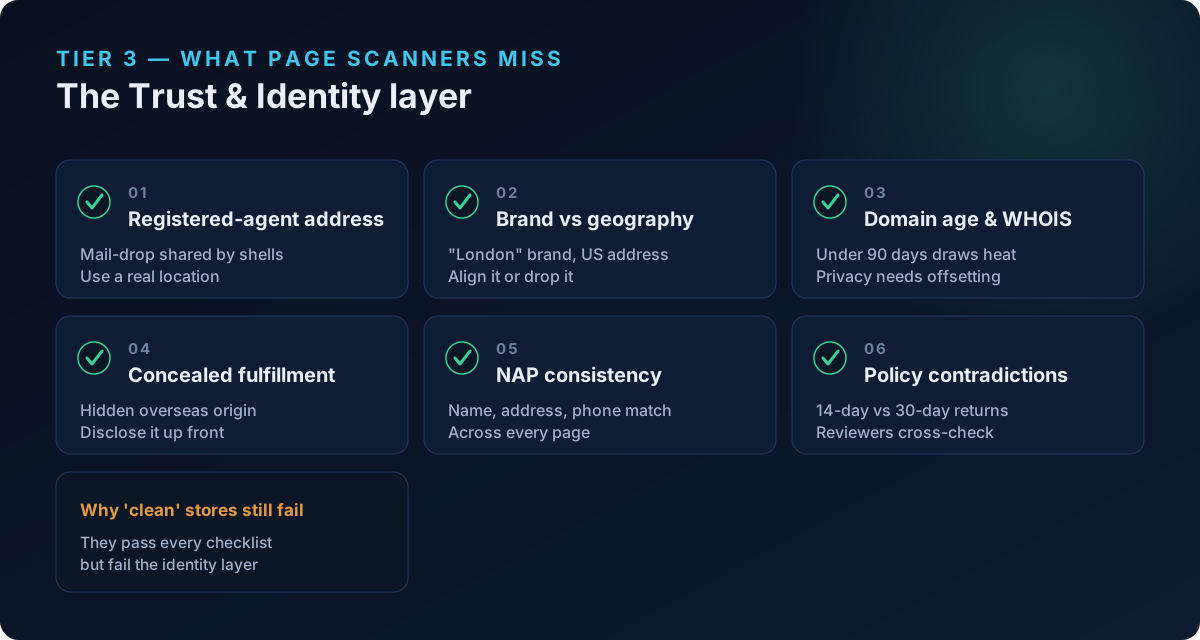
Here is the uncomfortable truth about Misrepresentation suspensions: most stores that get hit already have contact pages, policy pages, and clean feeds. They pass every checklist above. What they fail is the business-legitimacy layer — the signals Google uses to decide whether you are a real, verifiable operation or a thin front. Simple page-presence scanners never look here. This is the layer that separates a store that gets reinstated from one stuck in an endless cooldown loop.
Audit each of the following honestly.
1. Registered-agent and "mail-drop" addresses
If the business address you show is actually a mass-incorporation or registered-agent address — a mailbox shared by thousands of shell entities (think Harvard Business Services in Delaware, CT Corporation, or Registered Agents Inc) — Google can recognize it. An address that resolves to a formation service rather than a real place of business is a textbook trust gap. Use an address that reflects where the business actually operates.
2. Brand-implied geography vs reality
If your brand name implies a place — "London," "Nordic," "Milano" — reviewers expect the rest of your identity to back it up. A brand called "Spencer London" with a US registered-agent address, a .com domain, USD-only pricing, and no UK phone number sends a contradictory-geography signal. Either align your address, phone, currency, and TLD with the implied location, or drop the geographic implication from the brand.
3. Domain age and WHOIS privacy
Very new domains (under ~90 days) and domains hidden behind WHOIS privacy draw heavier scrutiny. This is not a hard disqualifier — plenty of legitimate new brands launch fresh — but it means every other trust signal has to be stronger to compensate. If your domain is brand new, over-invest in verifiable contact info, consistent identity, and real policy pages before you advertise.
4. Concealed fulfillment origin
This is the Omission of relevant information trap. If your shipping or terms prose quietly admits "items ship from our overseas warehouse in 15–25 business days" while the rest of the store presents a domestic identity, that mismatch is precisely what Google's policy targets. The fix is not to hide it harder — it's to disclose fulfillment origin and realistic delivery times prominently and consistently, so nothing feels concealed.
5. NAP consistency (name, address, phone)
Your Name, Address, and Phone must match across your storefront footer, Contact page, legal/policy pages, and Merchant Center settings. A subtle but common failure: your legal entity name ("Acme Commerce LLC") appearing on policy pages while your brand name ("Acme") appears everywhere else, with no line connecting them. State the relationship somewhere ("Acme is a trading name of Acme Commerce LLC") so the two identities reconcile.
6. Contradictory policy statements
Beyond shipping-vs-terms mismatches, scan for any two legal pages that disagree — a 30-day return window on one page and 14 days on another, a "no international shipping" line contradicted by an international rate. Reviewers read these pages against each other. Every contradiction is a data point for "this business is not internally consistent," which is the essence of a misrepresentation flag.
Untrustworthy promotions and pricing (post-October 2025)
A dedicated pass, because the 2025 update sharpened it. Under the Untrustworthy Promotions and updated Misrepresentation policies:
- Countdown timers that reset on refresh, or "only 2 left" claims that never change, read as false urgency.
- "Was/now" strike-through pricing must reflect a genuine former price, not an invented anchor.
- Free-trial and subscription terms — including automatic billing — must be disclosed clearly and up front.
- All costs and payment terms must be visible before checkout so nothing looks like a hidden charge.
If a claim can't survive a reviewer clicking through, remove it.
How to run this as a repeatable scan (not a one-time cleanup)
Working through 30+ checks by hand across every product and policy page is slow and easy to get wrong — and compliance is not a one-time state. A theme update, a new app, a currency change, or a sold-out variant can silently reintroduce a violation weeks after you passed.
This is the gap ShopFlix AI is built to close. It scans your live Shopify store against these same categories in tiers: Basic covers store fundamentals and policy/contact pages; Advanced audits the product-feed layer — GTIN/MPN/brand, price and availability consistency, image compliance; and Deep adds the misrepresentation, checkout, and the newer Trust & Identity layer — the registered-agent addresses, brand-vs-geography contradictions, domain-age and WHOIS signals, concealed fulfillment origin, and NAP consistency that page-presence tools never inspect. Instead of guessing which of a dozen things Google objected to, you get the specific findings and the fixes, and you can re-scan after every change.
Frequently asked questions
How long does a Google Merchant Center review take?
Account reviews typically take up to 7 business days, and re-review requests for Shopify stores usually resolve in 3–7 business days, though complex cases take longer. Reinstatement isn't guaranteed — Google reinstates accounts only when there's a compelling, well-documented case, so submit your appeal only after you've genuinely fixed the issues, not as a first move.
Why did my account get suspended with no specific reason given?
This is by design and it's maddening, but the "Misrepresentation" label is deliberately broad. It rarely means Google thinks you're a scammer — it usually means their review couldn't verify that you're a transparent, consistent, legitimate business. The most productive response is to audit the Trust & Identity signals in Tier 3, because that's where verifiable-legitimacy gaps hide, and they're the ones stores most often overlook.
Do all my products need a GTIN?
No. If a product has a manufacturer-assigned GTIN you must submit it, and submitting an invalid one risks suspension. But genuinely custom, handmade, or one-of-a-kind items don't have GTINs — for those, set identifier_exists to no so Google understands the omission is intentional rather than an error.
Is a "Contact Us" form enough contact information?
No. A single contact form on its own commonly fails Google's check. Show at least two contact methods — for example an address plus a phone number, or an email plus a linked social profile — visibly on your live storefront, and make sure they match your Merchant Center business details exactly.
Will a brand-new domain get me suspended automatically?
Not automatically, but a domain under ~90 days old, especially one behind WHOIS privacy, draws heavier scrutiny. It means your other trust signals — contact info, consistent identity, real policy pages, disclosed fulfillment — need to be airtight to compensate. Build those before you advertise rather than launching ads on day one.
How often should I re-audit for compliance?
Treat it as ongoing. Re-scan after any theme change, new app install, currency or pricing change, or catalog update, and on a regular cadence otherwise. Violations get reintroduced silently, and it's far cheaper to catch one in a routine scan than to recover from a suspension.
Scan your store before Google does
Every item on this checklist is something Google can see from the outside — which means you can see it too, if you look in the right places. Run a free public scan at shopflixai.com to check your store against these categories right now, or install the ShopFlix AI app on the Shopify App Store to run tiered Basic, Advanced, and Deep scans, fix issues in place, and re-audit after every change. The best time to find a compliance gap is before a reviewer does.
Stop guessing why Google flagged your store
Run a free scan to see the exact issues Google checks for — then install the ShopFlix AI app to fix them automatically and stay approved.
0 Comments
No comments yet — share your experience or ask a question below.
Leave a comment