You did everything the setup guides told you. You formed an LLC, you got a "business address" from an incorporation service, you pasted it into Google Merchant Center and into your store footer, and you assumed you were covered. Then the email arrives: account suspended for Misrepresentation. No product was wrong. Your prices matched. And yet Google decided your store isn't who it says it is.
If your "business address" is actually a registered-agent address, a virtual office, or a mail-drop suite shared by hundreds of other companies, you have stumbled into one of the most under-explained suspension triggers on Google Shopping. This guide explains exactly why Google treats that address as a trust failure, what its policies actually say, and the concrete steps to fix it on a Shopify store — without pretending to be something you're not.
What a registered-agent or mail-drop address actually is
When you form a US LLC through a service like Harvard Business Services, CT Corporation, Registered Agents Inc, Northwest, or a Delaware/Wyoming formation package, you receive a registered agent and often a mailing address. That address exists for one legal purpose: to receive official state and legal correspondence on behalf of the company.
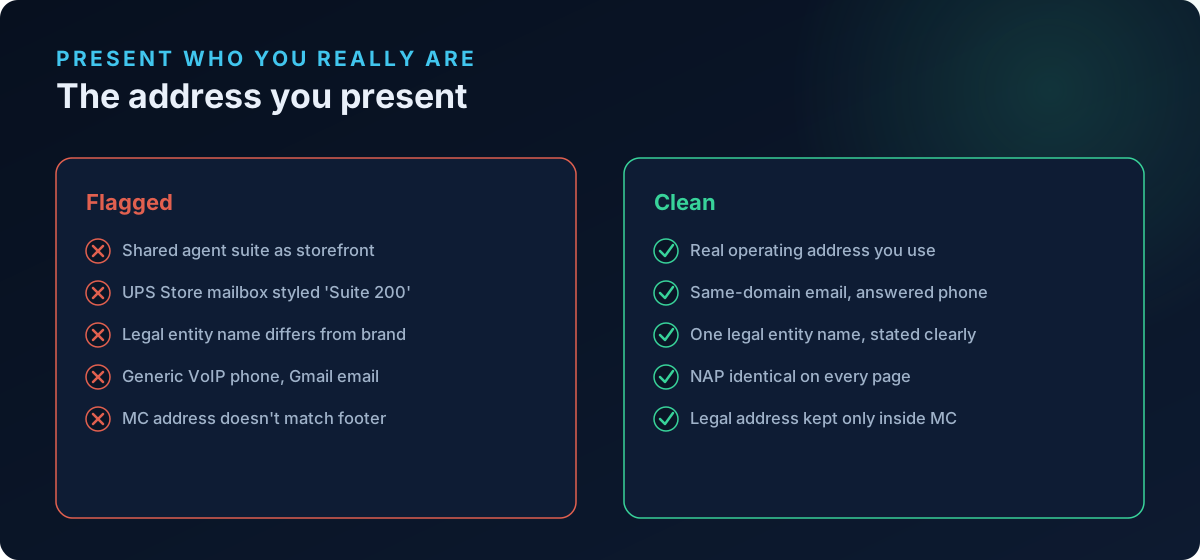
It is not evidence that a real business operates there. The same suite number is shared across thousands of unrelated LLCs. Coworking "virtual offices," UPS Store mailboxes rendered as "Suite 200," and PO boxes dressed up with a street format all fall into the same bucket. To a human they look like an address. To Google's trust systems, they look like exactly what they are: a place where no one running your store actually sits.
The problem isn't that the address is illegal — it's completely legal. The problem is that you are presenting it as your operating business address to consumers and to Google, and it doesn't identify a real, reachable business. That gap is what Google's Misrepresentation policy is designed to catch.
What Google's policies actually say
Two policies do most of the work here, and it helps to quote them accurately rather than guess.
Misrepresentation
Google's Misrepresentation policy prohibits merchants from "hiding or misrepresenting information about your business." Among the listed violations, you cannot:
- Present a false identity, business name, or contact information.
- Impersonate other businesses or conceal your identity.
- Fail to disclose relevant information — what Google calls Omission of relevant information.
Google is explicit that Misrepresentation violations are treated as egregious, meaning an account can be suspended upon detection and without prior warning. There is no "three strikes." A single trust failure is enough.
A registered-agent address maps directly onto "false or misleading contact information." You are telling shoppers and Google, "This is where our business is," when in fact nobody there can answer a question about your store. Google's remediation guidance for Misrepresentation asks you to describe your business clearly and provide accurate, updated contact details — the exact thing a mail-drop address fails to do.
Insufficient contact information
Separately, Google requires reachable contact information. Since 2021 the on-site requirement has been relaxed to a minimum of one contact method — a physical address, phone number, email, contact form, or a business social profile. But two things still trip Shopify merchants up:
- Relaxed on-site rules do not relax the Merchant Center business-info requirement. You must still provide accurate, verifiable business details in Settings → Business info inside Merchant Center, and Google may verify them.
- If the only contact signal you provide is a mail-drop address, and Google can tell it's a mass-incorporation address, you get the worst of both policies at once — thin contact information and a misrepresentation flag.
Why Google can tell your address is a mail drop
Merchants often assume Google can't distinguish a real suite from a virtual one. It can, and cheaply.
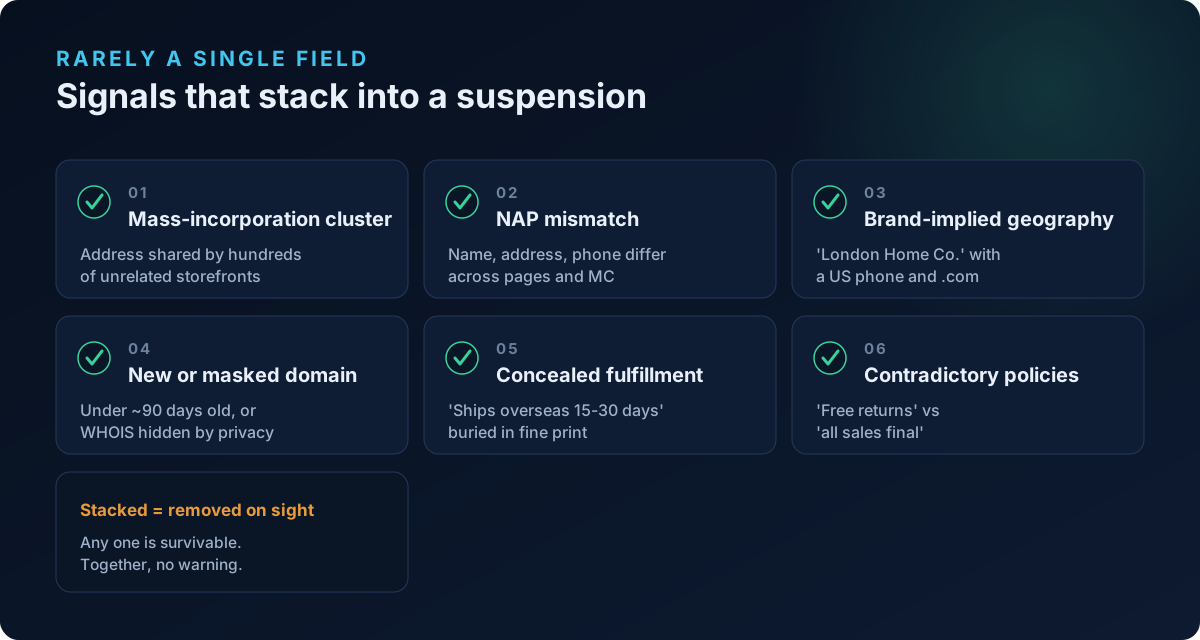
- Mass-incorporation clustering. The registered-agent addresses of the big formation services are well known and appear on thousands of storefronts. An address shared by hundreds of unrelated merchants is a strong signal on its own.
- NAP mismatch. Your Name, Address, Phone should be consistent across your storefront footer, contact page, legal pages, and Merchant Center. When the address is a placeholder, these rarely line up — the legal entity name differs from the brand, the phone is a generic VoIP number, and the Merchant Center address doesn't match the footer.
- Reverse lookups. The address resolves to a UPS Store, a coworking brand, or a registered-agent office rather than anything connected to your brand.
None of this requires a human reviewer. It's pattern-matching, and it runs before a review is even requested.
The real fix: stop presenting an address you don't operate from
The goal is not to find a cleverer fake address. It's to make your store's identity true and consistent. Here is the practical path for a Shopify merchant.
1. Decide what your real, defensible contact reality is
You have three honest options, in rough order of strength:
- A real operating address — your home office, studio, warehouse, or leased space. If you're comfortable listing it (many sole proprietors and small brands are), this is the strongest signal.
- A genuine staffed location or fulfillment address you actually use, listed as such.
- Lead with a non-address contact method — a working, monitored email on your own domain plus a real phone number and a contact form — and provide the accurate business address only inside Merchant Center's Business info, where the mail-drop remains your legal registered address but is not dressed up as a storefront "visit us" location.
The one option that is off the table is continuing to present a shared mail-drop as your operating business address across the public storefront.
2. Make NAP consistent everywhere
Pick one legal entity name, one address, one phone, and repeat them identically across:
- Your Shopify footer (add contact info to the footer of every page).
- Your Contact page.
- Your Privacy Policy, Terms, Shipping, and Returns pages.
- Merchant Center Settings → Business info.
If your brand name and legal entity differ (e.g. brand "Nordic Wick" / entity "NW Commerce LLC"), state the relationship somewhere — "Nordic Wick is a trading name of NW Commerce LLC" — rather than letting Google discover a mismatch and read it as concealment. This same consistency discipline is what we cover in our guide to passing Merchant Center identity verification.
3. Add a real, reachable phone and a same-domain email
- Use an email on your own domain (support@yourbrand.com), not a Gmail/Outlook address.
- List a working phone number that a person or a monitored line actually answers.
- Keep a contact form as a backup, not as your only channel.
4. Fix your Merchant Center business info, then request review
In Merchant Center, go to Settings → Business info → Business details and enter the accurate business name, address, and phone. Complete any identity verification Google requests — note that Request review often stays greyed out until identity verification is finished. Only request the review once your storefront and Merchant Center tell the same story.
The trust failures that travel with a mail-drop address
A registered-agent address rarely shows up alone. In real Misrepresentation cases it clusters with other business-legitimacy problems that page-presence checkers never look at. Watch for these:
- Brand-implied geography vs reality. A brand called "London Home Co." with no UK address, a US phone, prices in USD, and a
.com— the name implies a country the business has no connection to. Google reads the implied claim, not your intent. - Very new or privacy-masked domain. Domains younger than about 90 days, or with WHOIS ownership hidden behind privacy, draw heavier scrutiny — especially paired with a mail-drop address and a country-implying brand.
- Concealed fulfillment origin. Shipping or Terms prose that quietly admits "ships from our overseas warehouse in 15-30 days" behind an otherwise domestic-looking identity is a textbook Omission of relevant information violation. Disclose long fulfillment times and origin clearly and early, not in fine print.
- Contradictory policy statements. A Returns page promising "30-day free returns" while your Terms say "all sales final," or two different addresses on two legal pages, reads as an untrustworthy store even if each page is individually plausible.
- Untrustworthy Promotions and Conditions Not Met. Once trust is already thin, aggressive countdown timers, phantom discounts, or promo conditions the checkout doesn't honor push a shaky account over the edge into suspension.
Any one of these is survivable. Stacked together — mail-drop address, London-sounding brand, a two-month-old masked domain, and a hidden overseas warehouse — they form the exact profile Google's Misrepresentation systems are tuned to remove without warning.
A short checklist before you re-request review
- Replace or reframe any registered-agent / mail-drop address so it is no longer presented as your operating storefront address.
- Make Name, Address, Phone identical across footer, contact page, all legal pages, and Merchant Center.
- Reconcile brand name vs legal entity name, and explain any implied geography honestly.
- Add a same-domain email and a real phone number.
- Disclose fulfillment origin and shipping times clearly, up front.
- Remove contradictions between your own legal pages.
- Complete identity verification, then request review once — not before everything above is true.
Frequently asked questions
Is a registered agent address actually against Google's policy?
The address itself is legal, but presenting it as your operating business address when no real business operates there can violate the Misrepresentation policy's rule against false or misleading contact information. Google wants contact details that identify a genuine, reachable business. A shared mail-drop presented as a storefront location fails that test.
Can I use a virtual office or PO box as my business address?
For the address you show publicly as "where the business is," you should avoid virtual offices, UPS Store mailboxes, and PO boxes styled as suites. Since 2021 Google only requires one contact method on your site, so you can lead with a real email, phone, and contact form instead, and keep your accurate legal address only in Merchant Center's Business info.
My brand name sounds British but I'm based in the US. Is that a problem?
It can be. If a brand name implies a country and nothing else — address, phone, currency, domain — supports that claim, Google may read it as an implied misrepresentation of your business's location. The fix is to align the signals or make your real location clear and consistent rather than leaning on the implication.
I list an overseas warehouse in my shipping policy. Isn't that enough disclosure?
Only if it's clear and easy to find. Google's Omission of relevant information rule targets disclosures that are buried, vague, or discoverable only after purchase. If fulfillment ships from overseas with long timelines, say so plainly near the top of your Shipping page and on the product page, not in fine print at the bottom of Terms.
How fast can I get reinstated after fixing the address?
There is no guaranteed timeline. Fix every issue before requesting review, because repeated failed reviews slow you down and can harden the suspension. Make your storefront and Merchant Center tell one consistent, truthful story, then request review once.
Will just changing the address in Merchant Center fix it?
Rarely on its own. Suspensions of this type are usually about the pattern — address, NAP consistency, brand-geography, domain age, fulfillment disclosure — not a single field. Reconcile the whole identity across your store and Merchant Center, not just the one address box.
Scan your store before Google does
Most of these signals — a mass-incorporation address, NAP mismatches, brand-implied geography, a masked or brand-new domain, concealed fulfillment origin, and contradictory legal pages — are invisible in Google Merchant Center until the suspension email lands. ShopFlix AI's Trust & Identity layer (part of the Deep scan) checks exactly these business-legitimacy signals that page-presence scanners miss, on top of the Basic (store fundamentals and policy/contact pages) and Advanced (product-feed) checks. Run a free public scan at shopflixai.com to see where your store's identity looks untrustworthy, or install the ShopFlix AI app on the Shopify App Store to scan and fix these issues before Google decides for you.
Stop guessing why Google flagged your store
Run a free scan to see the exact issues Google checks for — then install the ShopFlix AI app to fix them automatically and stay approved.
0 Comments
No comments yet — share your experience or ask a question below.
Leave a comment