You added a phone number. You wrote a Contact page. You published Refund, Privacy, Shipping and Terms pages. You added GTINs to every product, fixed the pricing mismatches, and cleaned up the placeholder text. You submitted your appeal, waited out the cooldown, and Google came back with the same one-word verdict: Misrepresentation. No detail. No line item. No "here is the offending field." Just suspended again.
If that sounds like the last three weeks of your life, you are not doing anything wrong in your appeals. You are fixing the wrong layer. Almost every free "GMC checklist" and scanner on the market checks whether pages exist — does a Contact page load, is there a phone number in the footer, are the policy links present. Google stopped grading stores on page presence a long time ago. What suspends stores in 2025 and 2026 is the trust and identity layer: the signals that tell Google whether the business behind the storefront is real, consistent, and who it claims to be. That layer is invisible to checklist tools, and it is exactly where repeat suspensions live.
Why "everything looks fixed" and Google still says no
Google's Misrepresentation policy is explicit that these violations are treated as egregious — accounts are suspended on detection, often without a warning, and the notice rarely names the specific problem. Under that policy, "Unacceptable business practices" includes "presenting false business names, identities, or contact information" and "impersonating other businesses to conceal identity." "Omission of relevant information" covers hiding relevant details about your business or products from customers. Neither of those is something a page-presence scanner can see, because the pages can all be present and still tell an inconsistent or misleading story.
This is why the Shopify Community is full of threads titled some variation of "Misrepresentation suspension with zero actionable details — repeated cooldowns." Merchants fix the obvious surface issues, resubmit, and get re-suspended because the underlying identity signals never changed. The appeal form gives you a text box, not a diagnostic. So you are guessing — and Google is grading you against data you cannot see: WHOIS records, domain history, address databases, and cross-references to your own legal pages.
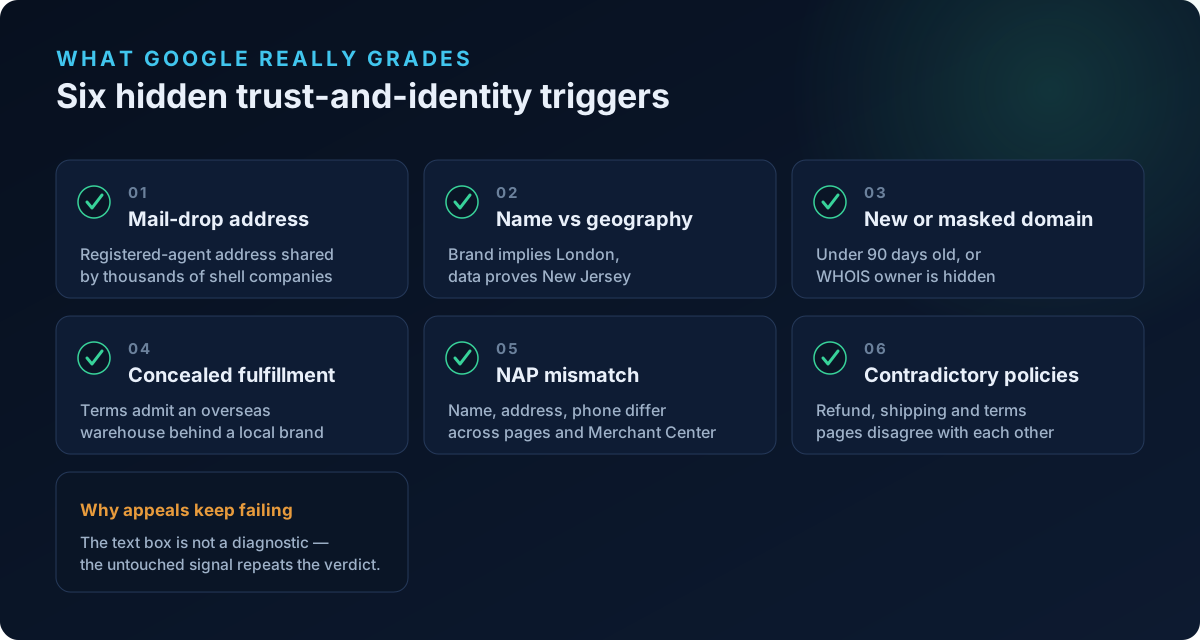
Below are the six trust-and-identity checks that actually move a misrepresentation flag, why each one triggers Google, and exactly how to fix it.
1. Your business address is a registered-agent "mail drop"
This is the single most common hidden trigger, and it fools almost everyone because the address is technically real.
When you incorporate an LLC in the US, services like Harvard Business Services, CT Corporation, Registered Agents Inc, Northwest Registered Agent, and similar firms give you a registered-agent address — a mass-incorporation address shared by tens of thousands of companies. Merchants then paste that address into their storefront footer and Merchant Center as their "business address," assuming an official-looking address helps.
It does the opposite. Google cross-references business addresses against its own data, and an address flagged as a shared incorporation-service or mail-forwarding location is a strong misrepresentation signal — it reads as "this business has no verifiable physical presence and is concealing where it actually operates."
How to fix it:
- Do not use your registered agent's address as your public or Merchant Center business address. That address is for legal service of process only.
- Use a real address where your business operates — a home office (many legitimate small businesses do this), a coworking space you actually use, or your fulfillment/warehouse location.
- Keep that same address identical across your storefront footer, Contact page, legal pages, and Merchant Center business information.
- If you genuinely have no physical presence, that is itself the problem Google is flagging — build one verifiable location before you re-appeal.
2. Your brand name implies a country you have no connection to
A store called "London Leather Co." with a US registration, a .com domain, prices in USD, and a phone number that isn't a UK number is making a geographic claim it can't back up. Names implying "London," "Nordic," "Milano," "Tokyo," "Swiss," and similar draw scrutiny because they suggest an origin, heritage, or place of business that the store's actual signals contradict.
Google looks for consistency between the identity your brand implies and the identity your data proves — address, phone number country code, currency, and even domain TLD. A mismatch here maps directly onto "presenting false business names or identities."
How to fix it:
- Make your real geography obvious and consistent: address, a phone number with the matching country code, and default currency all pointing to the same place.
- If your brand name implies a location, add an honest About page explaining the actual relationship (e.g., "designed in London, shipped from our New Jersey warehouse") rather than letting the name imply a false headquarters.
- Do not invent a foreign address to "match" the name. Fixing a geography mismatch by fabricating an address is a worse misrepresentation, not a fix.
3. Your domain is very new or its owner is hidden
Domain age is one of the hardest signals to fake, which is exactly why Google weights it heavily. A common merchant experience — and something GMC audit tools consistently flag — is that domains under about 90 days old receive heavier scrutiny, and domains under six months old often need extra third-party corroboration (directory listings, established social profiles) before Google trusts the identity.
Two related traps:
- WHOIS privacy / owner masking. Full privacy protection is normal and not itself a violation, but combined with a brand-new domain and a mail-drop address, it removes one more way for Google to verify you are real. The stack of "new + masked + shared address" is what tips a borderline account into suspension.
- Expired-domain purchases. If you bought a previously-used domain, Google tracks domain history. Its prior visibility and prior business can collide with your completely different new business and read as impersonation or identity change.
How to fix it:
- If your domain is new, do not rely on Google to trust you on faith. Establish corroborating signals fast: a consistent Google Business Profile, real social profiles, and directory listings that all carry the exact same name, address, and phone number.
- Give a new domain time and legitimate footprint before pouring ad spend through Shopping — the account is at its most fragile in its first 90 days.
- If you bought an aged domain, be prepared for extra verification and make sure nothing about the old business lingers (old cached pages, old brand references).
4. Your own shipping and terms pages admit an overseas warehouse
This one is self-inflicted and extremely common for stores that fulfill from overseas. Your storefront presents a domestic, local-sounding brand — but buried in your Shipping policy or Terms is a line like "orders ship from our overseas warehouse; please allow 15–30 business days." That contradiction between the identity you present and the fulfillment reality you disclose is textbook Omission of relevant information: you concealed a materially relevant fact (where the product actually ships from and how long it really takes) behind a domestic-looking identity.
Note the trap — the fix is not to delete the disclosure. Deleting it just moves you from "omission" to "unrealistic offer" or an "Untrustworthy Promotions"-adjacent problem when a customer expects two-day delivery and gets a month.
How to fix it:
- Be consistent, not silent. If you fulfill from overseas, say so clearly and consistently — on the product page, at checkout, and in the shipping policy — with honest delivery estimates.
- Align your brand identity with your fulfillment reality. Don't present a local boutique while shipping from a distant warehouse under a different story.
- Make sure delivery windows in your ads, product pages, and policy all agree. Contradictory shipping timelines across your own store are a red flag on their own.
5. Your name, address, and phone don't match everywhere (NAP consistency)
Google cross-references your identity across your storefront header and footer, Contact page, About page, legal pages, Merchant Center, Google Business Profile, social profiles, and public WHOIS. This is the same NAP consistency (Name, Address, Phone) discipline that local SEO has used for years, applied to trust verification. Under the Misrepresentation and Insufficient Contact Information policies, even small inconsistencies get read as an identity that doesn't hold together.
The subtle killers here:
- "Acme, Inc." in the footer vs. "Acme Inc" in Merchant Center vs. "Acme LLC" in your Terms — three different entity names for one store.
- A support phone number on the Contact page that differs from the one in Merchant Center.
- A legal entity name (the LLC that owns the store) that never appears anywhere the customer can see, so Google can't connect the storefront brand to a real registered business.
How to fix it:
- Pick one exact business name, one address, and one phone number, then make them byte-for-byte identical everywhere — storefront, all legal pages, Contact page, and Merchant Center business information.
- Surface your legal entity name somewhere visible (footer or Terms) so Google can tie the brand to the registered company. "Acme is a trading name of Acme Ventures LLC" is enough.
- Complete Merchant Center identity verification with documents whose name and address match your storefront exactly.
6. Your legal pages contradict each other
The last hidden trigger is contradiction within your own store. When a scanner only checks that pages exist, it never reads them against each other. Google does.
Common contradictions that read as misrepresentation:
- A Refund policy promising 30-day returns while the Terms page says "all sales final."
- A Shipping page quoting "3–5 day delivery" while Terms admit "15–30 business days."
- A Contact page listing one company name and the Privacy policy listing another.
- A "money-back guarantee" in your marketing copy that no policy page actually backs up — which can also drift into Untrustworthy Promotions and "Conditions not met" territory.
How to fix it:
- Read all your legal pages together, out loud if you have to, and reconcile every claim: return window, delivery time, guarantees, company name, and contact details must agree across pages.
- Delete or rewrite any generic template clauses left over from a theme or an app — leftover boilerplate is a frequent source of accidental contradictions.
- Make sure any promise in your product or ad copy is honored by an actual policy page.
Why checklist scanners miss all six
Every issue above shares one property: it is about consistency and legitimacy of meaning, not the presence of an element. A page-presence checklist confirms a Contact page loads; it cannot tell that the address on it is a mass-incorporation mail drop. It confirms a Shipping page exists; it cannot tell that the page contradicts your Terms. It confirms a brand name is set; it cannot tell the name implies London while everything else says New Jersey.
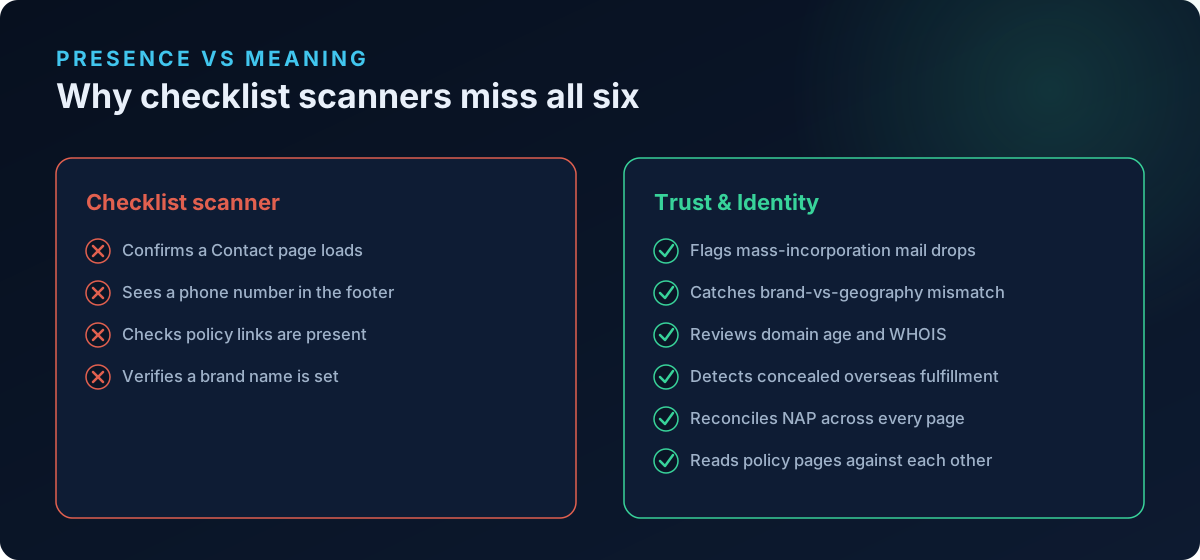
This is the gap we built ShopFlix AI's Trust and Identity layer to close. Our Basic scan covers store fundamentals and policy/contact pages; the Advanced scan covers product-feed data like GTIN, MPN, brand, price, availability and image compliance; and the Deep scan adds the misrepresentation, checkout, and Trust and Identity checks — the mail-drop address detection, brand-vs-geography mismatch, domain age and WHOIS review, concealed-fulfillment-origin analysis, NAP consistency across every page and Merchant Center, and cross-page policy contradiction detection. It is designed to surface the exact signals Google grades you on but never tells you about. If you want to go deeper on one signal, our guide on why a registered-agent address gets you suspended breaks down the single most common hidden trigger.
Frequently asked questions
Why do I keep getting suspended after every appeal?
Because your appeals are fixing surface issues (missing pages, contact info) while the underlying trigger is an identity or consistency signal that never changed — a mail-drop address, a name/geography mismatch, or contradictory policy pages. Google re-checks the same signals each time, so if the real cause is untouched, the verdict repeats. Diagnose the trust and identity layer before your next appeal, and change the actual signal, not just the storefront copy.
Google won't tell me what's wrong. How am I supposed to fix it?
The misrepresentation notice is deliberately vague because these violations are treated as egregious. You have to reverse-engineer it by auditing the signals Google actually checks: business address legitimacy, NAP consistency across every page and Merchant Center, domain age and WHOIS, brand-vs-geography alignment, and internal policy contradictions. Fix all of them before re-appealing rather than changing one thing and hoping.
Is a registered-agent address really a problem if it's my real legal address?
Yes. A registered-agent address is valid for legal service of process, but it is a shared mass-incorporation address that Google can recognize, and using it as your public business address reads as concealing your real location. Use a genuine operating address that is consistent everywhere, and keep the registered agent strictly for legal correspondence.
I dropship from overseas. Do I have to disclose that?
Yes, and disclosing it honestly is safer than hiding it. Concealing overseas fulfillment behind a domestic-looking brand is an "omission of relevant information" violation. State your shipping origin and realistic delivery times consistently on product pages, at checkout, and in your shipping policy — and make sure your brand identity doesn't contradict that reality.
My domain is only two months old. Should I wait before running Shopping ads?
New domains under about 90 days face heavier scrutiny and are at their most fragile. Rushing ad spend through a brand-new domain with no corroborating footprint is a common path to a fast suspension. Build consistent third-party signals first — Google Business Profile, real social profiles, directory listings — all with identical name, address, and phone, then scale in.
Will fixing my brand name to match my location get me reinstated?
If a name-vs-geography mismatch was your trigger, aligning your real address, phone country code, currency, and an honest About page can help — but only if it's paired with fixing every other trust signal. Never fix a mismatch by fabricating a foreign address; that turns a soft signal into a hard misrepresentation. Reconcile the whole identity layer, then re-appeal once.
Scan your store before Google does
You cannot out-appeal a signal you can't see. Before you burn another cooldown, run a free public scan at shopflixai.com to surface the trust and identity issues driving your misrepresentation flag — mail-drop addresses, name-vs-geography mismatches, domain and WHOIS risk, concealed fulfillment, NAP inconsistencies, and contradictory policy pages. When you're ready to fix them at the source and keep your Shopify store compliant, install ShopFlix AI on the Shopify App Store and let the Deep scan check the layer every other scanner skips.
Stop guessing why Google flagged your store
Run a free scan to see the exact issues Google checks for — then install the ShopFlix AI app to fix them automatically and stay approved.
0 Comments
No comments yet — share your experience or ask a question below.
Leave a comment