You launched your Shopify store, uploaded your product feed to Google Merchant Center, and within hours — sometimes before you ran a single ad or made a single sale — you got the email: "Misrepresentation of self or business." No specifics. No clear instructions. Just a suspended account and a vague link to the policy.
If that's you, take a breath. This is the single most common reason new Shopify stores get suspended, and it almost never means Google thinks you're a scammer. It means Google's automated review couldn't verify that you're a real, transparent, trustworthy business yet. The good news: that's fixable, and you don't need an aged domain or a track record of sales to fix it. You need the right trust signals, set up consistently, before you advertise.
Why a brand-new store gets flagged before it does anything
Google's Misrepresentation policy is explicit that the issue does not require intentional deception. It covers any business or offer that is unclear, inconsistent, or not verifiable. A week-old store with thin contact info, a placeholder About page, and a feed that doesn't perfectly match the live site fits that description — even if everything you've published is 100% honest.
The policy breaks into four buckets, and new stores trip the first and third most often:
- Unacceptable business practices — hiding information, impersonating a brand, phishing.
- Misleading or unrealistic offers — fake discounts, impossible promises.
- Omission of relevant information — your payment model, terms, shipping, and return/refund policy aren't disclosed or aren't easy to find.
- Unavailable offers — products that are out of stock or promotions that have expired.
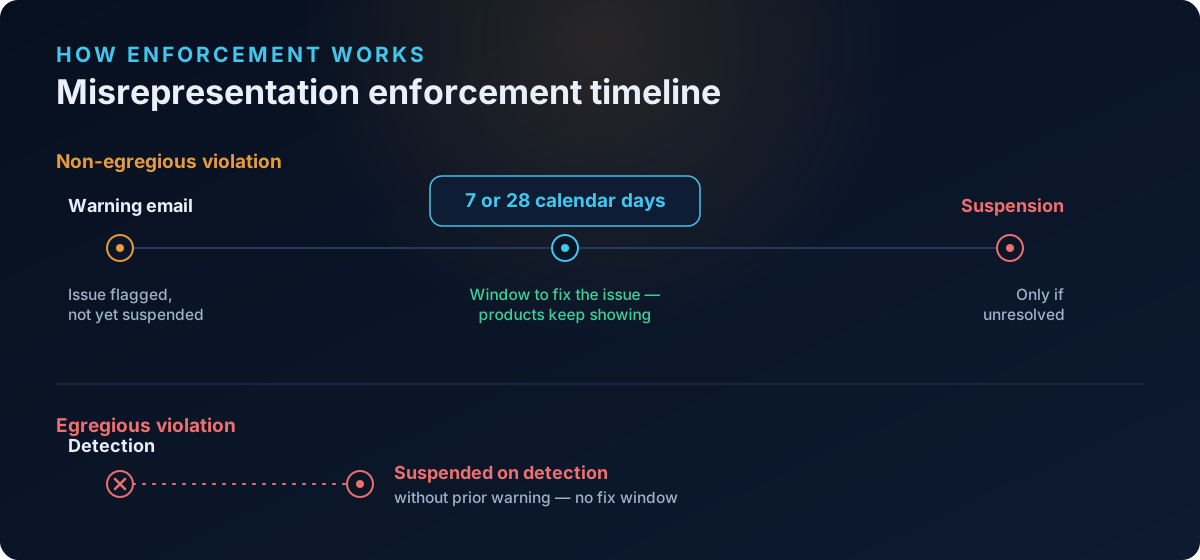
For most (non-egregious) violations, Google sends a warning email and gives you 7 or 28 calendar days to fix the issue before suspending. For egregious violations, accounts are "suspended upon detection and without prior warning" — which is why day-one suspensions feel so abrupt.
Before you do anything else, find out exactly which trust gaps your store has. Run a free scan at shopflixai.com — it checks your store against the same categories Google's reviewers look at (policy pages, contact and trust signals, feed and price consistency, images, and misrepresentation flags) and tells you precisely what to fix before you appeal.
What "warming up" actually means in 2026
There's a myth that you must let a store sit untouched for 30 or 90 days before Google trusts it. Google does not publish a minimum domain age, and there is no fixed "new store waiting period." Practitioner consensus (FeedArmy and others) is consistent: a legitimate business with real operations and all the basics in place tends to get approved within days. Pure dropshipping stores with no verifiable presence often take longer — but that's about building real legitimacy, not waiting out a timer.
So "warming up" doesn't mean idling. It means assembling verifiable proof that you are who you say you are before you request a review or spend on ads.
The trust-signal checklist to complete before you advertise
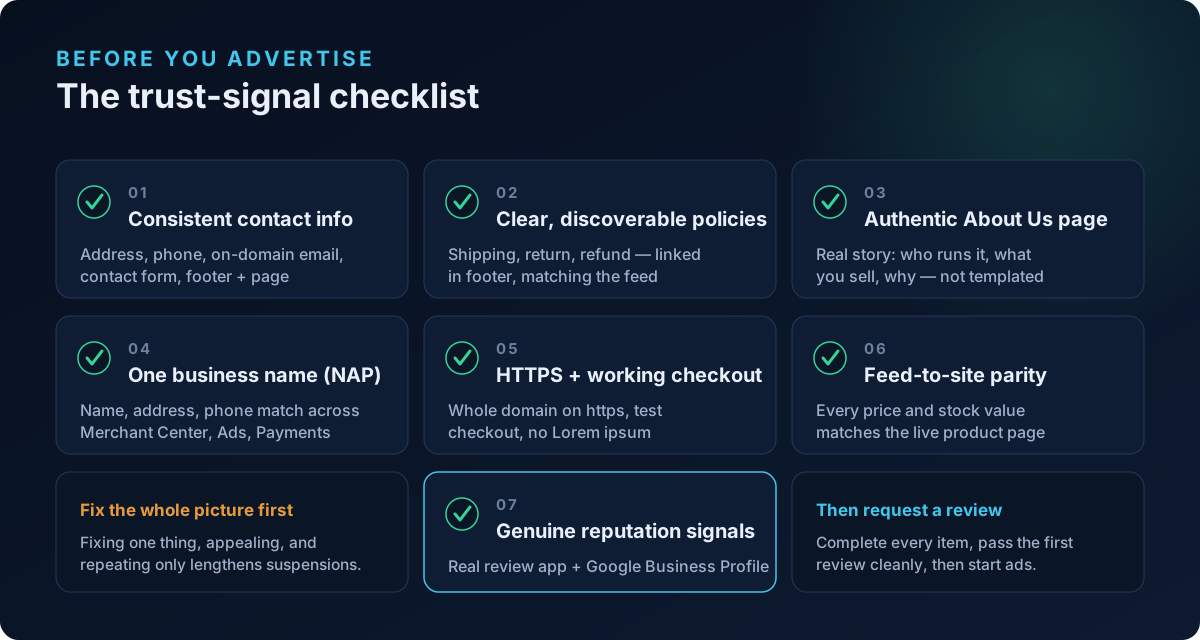
Work through every item below. The mistake that lengthens suspensions is fixing one thing, appealing, getting denied, and repeating. Fix the whole picture first.
1. Complete, consistent contact information. Add a full physical address, a phone number you actually answer during business hours, an on-domain email (you@yourstore.com, not a free Gmail), and a contact form. Put contact details in your footer and on a dedicated Contact page.
2. Clear, discoverable policies. Publish specific shipping, return, and refund policies with real timeframes and conditions. Link them in the footer so they're reachable from every page. Critically, these must match what your product pages and feed say.
3. An authentic About Us page. Tell the real story of your business — who runs it, what you sell, why. Generic, templated text reads as a non-business.
4. One consistent business name everywhere. This is the most important 2025–2026 change in how misrepresentation is enforced. Your business name, address, and phone (NAP) must match exactly across Merchant Center, Google Ads, and your Google Payments profile. Google also cross-references these against external signals — your Google Business Profile, third-party directories, social profiles, and domain registration. If your storefront says one name, your Payments profile another, and your domain WHOIS a third, that inconsistency alone can trigger a flag.
5. Site security and a working checkout. The entire domain — not just the homepage — must load over https://. Test a full checkout. Remove any "coming soon," "Lorem ipsum," or broken links.
6. Feed-to-site parity. Every price and availability value in your feed must match the live product page. Don't advertise items that are out of stock.
7. Genuine reputation signals. Add a real customer-review app (Google Customer Reviews, Judge.me, or Yotpo), build out social profiles, and verify a Google Business Profile. Store ratings of 3.5 stars or higher can even surface in your ads.
Setting all of this up by hand is tedious, and it's easy to leave a gap that re-triggers the suspension. Install the ShopFlix AI app from the Shopify App Store to auto-fix the common misrepresentation triggers — policy pages, contact and trust signals, feed consistency — and monitor your store continuously so a regression doesn't get you suspended again after reinstatement.
The new video verification — and what to do without a storefront
As of September 2025, when you request a review after a misrepresentation suspension, Google may require a 3–5 minute continuous, unedited video of your business. Google's own Merchant Center community video (and reports from FeedArmy and PPC News Feed) confirm it typically wants to see your storefront or signage, staff-only areas, your inventory or storage, and one to three of your most expensive items on camera.
If you run a home-based or online-only business, this feels impossible — but it isn't. Film your actual working space: your home office or workspace, where you store or pack inventory, your packing materials, and your highest-value products in hand. Show yourself, narrate what your business does, and keep the camera rolling the entire time without cuts. The goal is authenticity, not a retail showroom. A genuine, continuous walkthrough of a real (if modest) operation is exactly what Google is trying to confirm.
How to appeal correctly — and what never to do
The "I disagree with the issue" button in Merchant Center is automated. No human reads it, and there's no way to attach proof. Clicking it without changing anything wastes one of your limited attempts. Instead:
- Fix the root cause — work through the full checklist above.
- Then request a review from inside Merchant Center.
- Submit any required video verification with that review.
You generally get a limited number of review attempts (commonly described as around two) before a cool-down period kicks in, and each premature, rejected review makes reinstatement progressively harder. Reviews typically take up to 7 business days.
One thing to never do: do not delete the suspended account and open a fresh Merchant Center, Google Ads account, or website for the same business. Google treats this as circumventing enforcement, and it can escalate a temporary suspension into a permanent ban.
Frequently asked questions
Why did my brand-new Shopify store get suspended for misrepresentation before I even ran an ad?
Because Merchant Center reviews your store when you connect your feed, not when you start advertising. If the review can't verify your business identity, find your policies, or match your feed to your live site, it flags misrepresentation — regardless of whether you've run ads or made sales. It's about verifiability, not intent.
Does Google suspend new accounts just because the store is new or has no sales history?
Not directly. Google doesn't publish a minimum domain age or sales requirement. A clean, verifiable new store can get approved in days. What looks like "punishing new stores" is usually missing trust signals that established stores happen to already have — complete contact info, real policies, consistent identity, and a working, secure site.
How long should I wait, and how should I warm up, before launching Google Shopping ads?
Don't wait idly — warm up actively. Complete the full trust-signal checklist, get your initial Merchant Center review to pass cleanly (about 3–7 business days for a tidy store), and let free listings settle in. Once you're approved and stable, start ads. Warming up is about establishing legitimacy, not running out a clock.
What trust signals does Google actually look for?
A verifiable business identity (legal name, physical address, working phone, on-domain email), NAP consistency across Merchant Center, Google Ads, Google Payments, and external sources, an authentic About Us page, clear and discoverable shipping/return/refund policies that match your product pages, full-site SSL with a working checkout, feed-to-site price and stock parity, and genuine reputation signals like verified reviews and a Google Business Profile.
What is the new video identity verification, and what do I do without a physical storefront?
Since September 2025, a review request after a misrepresentation suspension may require a 3–5 minute continuous, unedited video showing your premises, inventory, and most expensive items. If you're home-based or online-only, film your real workspace, where you store and pack inventory, and your top products in hand — narrated, in one unbroken take. Authenticity matters more than a retail location.
Why isn't my "I disagree" appeal working, and how many reviews can I request?
The "I disagree" path is fully automated, reads no evidence, and won't reinstate you on its own. Fix the actual causes first, then request a review. You typically get around two attempts before a cool-down period begins, and each rejected premature review makes the next one harder. Reviews take up to about 7 business days.
Can I just delete the suspended account and open a new Merchant Center or Ads account for the same store?
No. Google treats opening a new account, domain, or property to escape a suspension as circumventing enforcement, which can lead to a permanent ban. Reinstate the existing account by fixing the root cause and requesting a proper review.
Is dropshipping or print-on-demand the reason for my suspension, and can those stores get approved?
The business model itself isn't banned, but it raises Google's bar for verification, because there's often no stocked inventory or physical operation to confirm. Dropshipping and print-on-demand stores can absolutely get approved — they just need stronger, more consistent legitimacy signals: a clear business identity, transparent policies, real reviews, and accurate supplier and shipping information.
How long does a review take after I request reinstatement?
Reviews usually complete within 7 business days, though some resolve faster. For a brand-new store's first review, expect roughly 3–7 business days, and remember that free listings can take a few additional weeks to appear even after approval.
Stop guessing why Google flagged your store
Run a free scan to see the exact issues Google checks for — then install the ShopFlix AI app to fix them automatically and stay approved.
0 Comments
No comments yet — share your experience or ask a question below.
Leave a comment