Your storefront reads like a British boutique. The brand name evokes London, the copy says "designed in the UK," and checkout runs in pounds. But your parcels leave a warehouse in Shenzhen, take three weeks to arrive, and land in a poly mailer with a customs sticker. One morning you open Google Merchant Center and find your whole account suspended for Misrepresentation — no product-level warning, no appeal window, nothing you can point to and fix.
Here is the hard truth most merchants miss: Google did not suspend you for dropshipping, and it probably did not suspend you for any single product. It suspended you because your business identity and your fulfillment reality do not match, and it read that gap as an attempt to deceive shoppers about who you are and where their order comes from. This is what we call concealed fulfillment — and it is one of the fastest-growing triggers for account-level suspensions in 2025 and 2026.
What "concealed fulfillment" actually means to Google
Dropshipping is not banned. Google's policies explicitly allow reselling and third-party fulfillment. What is banned is misleading shoppers about material facts — and where a product ships from, how long it takes, and who is actually selling it are material facts.
Google's Misrepresentation policy prohibits offers that "present false business names or contact information" or make a store "seem like" something it is not. Its Omission of relevant information clause forbids "failure to clearly and conspicuously disclose all related conditions before and after purchase." When a store presents a domestic, established-brand identity while quietly fulfilling from overseas, it is arguably doing both: presenting a misleading identity and omitting the shipping-origin condition that would change a shopper's decision to buy.
Concealed fulfillment is rarely one lie. It is the accumulation of small mismatches that, taken together, tell Google's trust systems that the storefront is not what it claims to be:
- A brand name that implies a country the business has no real presence in.
- A "contact" address that turns out to be a mailbox service or registered-agent office.
- A brand-new, WHOIS-masked domain.
- Shipping copy that promises 2–3 day delivery while your terms admit "items ship from our international warehouse."
- A legal entity name on your policy pages that has nothing to do with the brand on your storefront.
Google does not need to see your supplier invoices. It reads these public signals — and so can any tool, including the free scanner we'll mention at the end.
The six trust signals Google reads before it trusts your store
Page-presence scanners tell you whether a Refund Policy page exists. That is not what gets stores suspended in 2026. Suspensions come from the business-legitimacy layer underneath your pages. Here are the six signals that matter, and how to bring each into compliance.
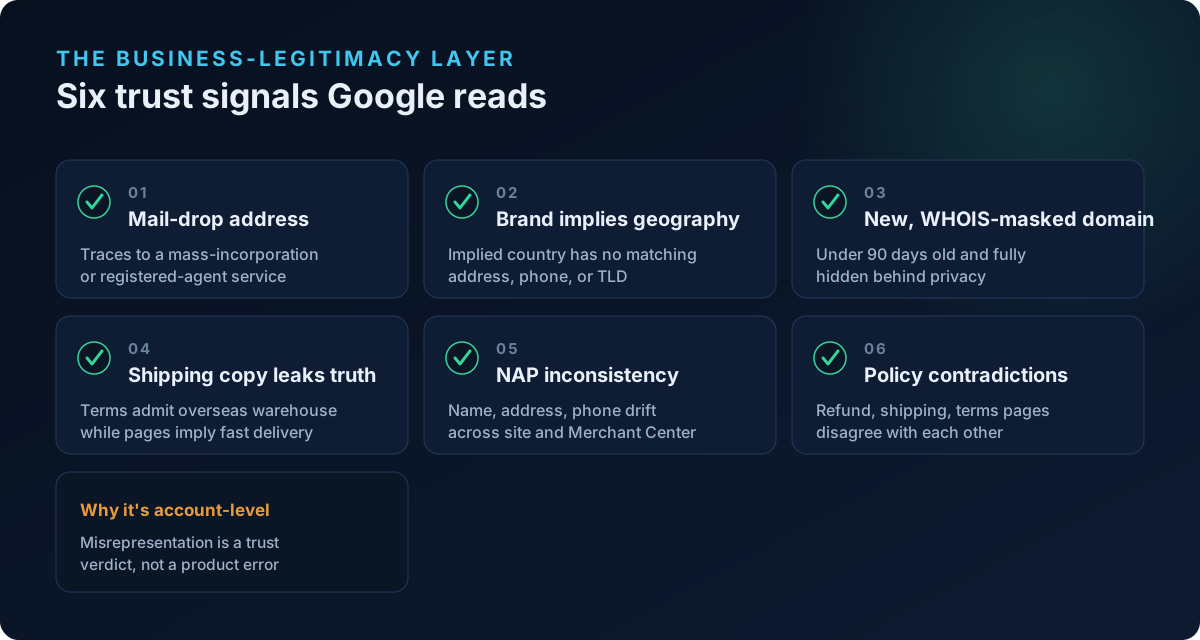
1. Your business address is a mail-drop, not a place
Google's Misrepresentation and Insufficient Contact Information expectations want a real, verifiable business behind the storefront. A large share of suspended stores list an address that belongs to a mass-incorporation or registered-agent service — the same street address shared by tens of thousands of shell entities.
If your listed address traces to a well-known registered-agent or "form an LLC" provider (the kind of mail-forwarding address used purely for incorporation), Google's systems can recognize it as a non-operational mail drop. It is not illegal to use one, but pairing it with an implied local brand reads as concealment.
Fix it:
- Use an address where your business genuinely operates or receives mail as an ongoing concern.
- If you legitimately use a registered agent for incorporation, that address should not double as your only public "contact us" location.
- Make sure the address on your storefront footer, Contact page, and Merchant Center business information are the same address.
2. Your brand implies a geography you can't back up
A brand called "Kensington Home" or "Nordic Living" sets a shopper's expectation of a UK or Scandinavian company. Google's systems — and your customers — then look for corroboration: a matching country address, a local phone number, the right currency, a country-code domain (like .co.uk). When the implied geography has no matching real-world signal, the mismatch itself becomes a misrepresentation flag.
Fix it:
- Align at least two of address, phone, currency, and TLD with the geography your brand implies.
- If you can't back up the implied country, drop the geographic implication from your brand messaging rather than fake it. "Designed for cold climates" is fine; "Made in Norway" when it is not is a suspension waiting to happen.
- Never claim "Made in [country]" or "Ships from [country]" unless it is literally true for the products in your feed.
3. Your domain is brand-new and WHOIS-masked
A domain registered fewer than ~90 days ago, with owner details hidden behind WHOIS privacy, draws heavier scrutiny. This is not automatic disqualification — most stores use privacy protection, and every store is new once. But a very new + fully masked + geographically-implied + overseas-fulfilling store is exactly the profile Google's models are tuned to distrust.
Fix it:
- You can't age a domain overnight, but you can compensate with stronger trust signals everywhere else: verified business info, consistent contact details, real policy pages, and social proof.
- Complete Merchant Center identity and business verification promptly — this is the single most important thing a new store can do. (See our guide on Merchant Center identity verification for Shopify.)
- Don't stack every risk factor at once. A new store that is otherwise transparent is treated very differently from a new store that hides everything.
4. Your shipping copy admits what your brand hides
This is the core of concealed fulfillment. Somewhere in your Shipping Policy or Terms, the truth leaks out: "Please allow 2–4 weeks as items ship from our overseas warehouse." Meanwhile your product pages and Merchant Center shipping settings imply fast domestic delivery. That contradiction is textbook Omission of relevant information and, when the identity is domestic, Misrepresentation.
Google is explicit that shoppers must know "how it will be shipped" and when they'll receive an order before they buy. Long overseas transit is not disqualifying on its own — hiding it is.
Fix it:
- Disclose the real fulfillment origin and realistic delivery window up front — on the product page, not buried in Terms. "Ships from our international warehouse. Estimated delivery: 12–20 business days" is compliant. A vague "Fast shipping!" over a 3-week reality is not.
- Make Merchant Center shipping settings, product-page estimates, and your Shipping Policy state the same transit times.
- If you offer faster options, price and label them honestly.
- Transparency about longer shipping costs you some conversions but keeps your account alive. A suspended account converts at zero.
5. NAP consistency: name, address, phone must match everywhere
Google cross-checks your Name, Address, Phone — plus email — across your storefront, Contact page, legal/policy pages, and Merchant Center. Any drift reads as a trust problem. A common trap: the brand name on your storefront differs from the legal entity name on your policy pages, with no explanation of the relationship.
Fix it:
- Make the legal business name, physical address, phone number, and email identical across storefront footer, Contact page, Privacy/Terms, and Merchant Center business information.
- If your brand name differs from your registered legal entity, state the link plainly: "Kensington Home is a trading name of [Legal Entity Ltd]."
- Use a working phone number and a domain-based email (not a free Gmail address) wherever possible.
6. Contradictions across your own legal pages
Suspensions frequently come from a store's own documents disagreeing with each other. The Refund Policy says 30 days; the Terms say 14. The Shipping Policy says "free worldwide shipping"; checkout charges for it. The Contact page lists a US address; the Terms name a Hong Kong entity. Each contradiction is a small Untrustworthy Promotion or Conditions Not Met risk, and together they paint a store that doesn't know its own rules.
Fix it:
- Read your Refund, Shipping, Terms, and Privacy pages side by side and reconcile every number and claim.
- Ensure the return window, restocking terms, shipping costs, and delivery times stated in policy match what a shopper actually sees at checkout.
- Whatever Merchant Center's return and shipping settings say must match the site.
Why appeals keep failing (and what to do instead)
Most merchants respond to a Misrepresentation suspension by hitting Request review again and again without changing anything meaningful. Google gives a deliberately broad reason and no checklist, so store owners guess. Reviews get rejected, patience for re-reviews runs out, and the account is effectively dead.
The reason repeat appeals fail is that Misrepresentation is an account-level, trust-based verdict, not a product-level error. You cannot fix it by editing one product. You have to repair the underlying identity and consistency signals before you appeal — ideally in a single pass so the reviewer sees a coherently trustworthy store.
A workable recovery sequence:
- Complete Merchant Center identity and business verification. Don't appeal an unverified account.
- Fix NAP consistency everywhere (signal 5) — this alone resolves a large share of cases.
- Disclose fulfillment origin and real delivery times on product pages and reconcile them with Merchant Center (signal 4).
- Reconcile contradictions across all legal pages (signal 6).
- Address the identity mismatch — align or drop implied geography (signal 2), and swap out mail-drop-only addresses (signal 1).
- Only then submit one clean review request that explains what you changed.
A short worked example
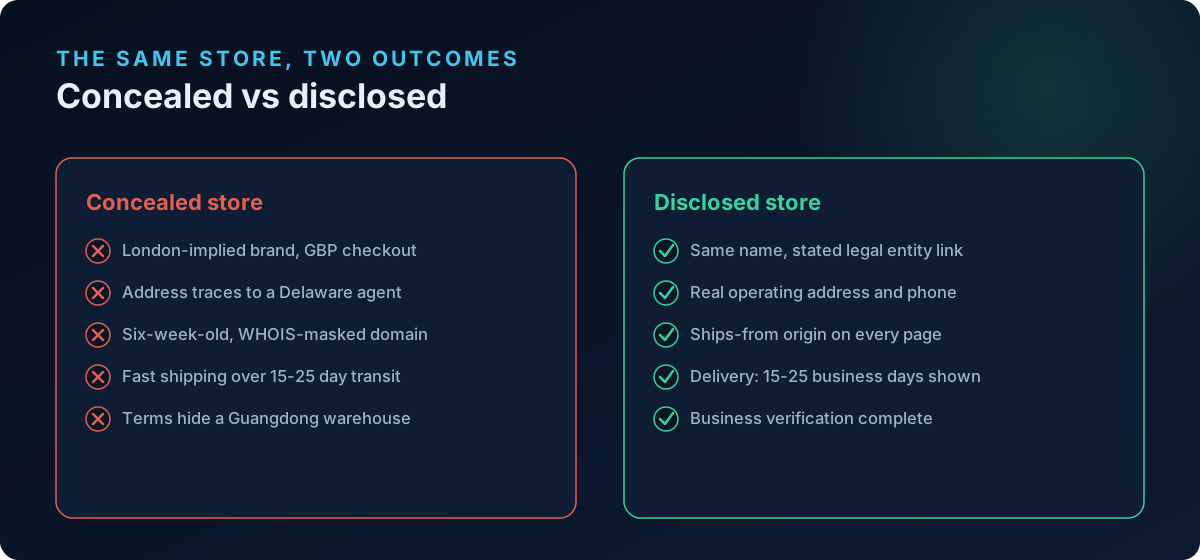
Consider a store branded "Chelsea & Rowe," GBP checkout, London-implied copy, domain registered six weeks ago with WHOIS privacy, address tracing to a registered-agent office in Delaware, and a Terms page admitting "items dispatched from our partner warehouse in Guangdong, 15–25 days." Every individual element is legal. Stacked together, they describe a store pretending to be a London brand while operating as an overseas dropshipper — the exact profile Google's Misrepresentation systems suspend on detection, without warning.
The compliant version of that same store: keep the name, but state "Chelsea & Rowe is a trading name of [Legal Entity]" with a real operating address and UK phone; put "Ships from our international warehouse — estimated delivery 15–25 business days" on every product page; match that window in Merchant Center; reconcile the refund and shipping policies; and complete business verification. Same products, same supplier — but now nothing is concealed, and there is nothing left to misrepresent.
Frequently asked questions
Is dropshipping or overseas fulfillment against Google Merchant Center policy?
No. Reselling and third-party fulfillment, including from overseas warehouses, are allowed. What violates policy is concealing those facts behind a misleading identity or omitting shipping-origin and delivery-time details that shoppers need before buying. Disclose the reality clearly and you can dropship compliantly.
Will admitting my products ship from China get me suspended?
The opposite — hiding it is what gets you suspended. Google requires that shoppers know how and when an order arrives. Stating a realistic delivery window and the fulfillment origin up front satisfies the Omission of relevant information requirement. Vague "fast shipping" claims over a multi-week reality are the actual violation.
Can I use a registered-agent or mailbox address as my business address?
For incorporation, yes. As your only public business address it becomes a risk, especially when paired with an implied local brand and overseas fulfillment. Google can recognize mass-incorporation mail-drop addresses. Use an address where your business genuinely operates, and keep it consistent across your site and Merchant Center.
My brand name implies a country I'm not based in. Do I have to rebrand?
Not necessarily rebrand, but you must stop implying a false geography or back it up. Either provide matching real signals (address, phone, currency, TLD in that country) or remove explicit "Made in / Based in" claims. Aspirational styling is fine; false factual claims about location are not.
Why does Google suspend the whole account instead of just one product?
Misrepresentation is a trust judgment about the business, not a data error on one item. Because it concerns who you are and whether shoppers can trust you, Google applies it at the account level and, for egregious cases, suspends "upon detection and without prior warning." That's why product-level edits rarely lift it.
How do I find these problems before Google does?
Audit the six signals above manually, or run an automated scan that checks the business-legitimacy layer — registered-agent addresses, brand-vs-geography mismatch, domain age and WHOIS, concealed fulfillment language, NAP consistency, and policy contradictions — rather than just confirming your policy pages exist.
Scan your store before Google does
Concealed fulfillment suspensions are preventable, but only if you catch the mismatches Google's systems read — which are exactly the signals surface-level checkers miss. ShopFlix AI scans your Shopify store for Merchant Center compliance across three tiers: Basic (store fundamentals, policy and contact pages), Advanced (product-feed data like GTIN/MPN/brand, price and availability, image compliance), and Deep, which adds the misrepresentation, checkout, and new Trust & Identity layer that flags mail-drop addresses, brand-vs-geography mismatches, risky domain/WHOIS profiles, concealed fulfillment language, NAP inconsistencies, and contradictory policy statements — then helps you fix them before you ever hit "Request review."
Run a free public scan at shopflixai.com, or install the ShopFlix AI Shopify app to scan, fix, and monitor your store on an ongoing basis. It's cheaper to look like Google looks at you now than to argue with a suspension later.
Stop guessing why Google flagged your store
Run a free scan to see the exact issues Google checks for — then install the ShopFlix AI app to fix them automatically and stay approved.
0 Comments
No comments yet — share your experience or ask a question below.
Leave a comment