You added a return policy. You added a shipping policy. You added terms of service, a privacy policy, and a contact page. On paper, your Shopify store checks every box Google asks for — and yet Merchant Center still hit you with the same maddeningly vague "Misrepresentation" suspension. You re-read the policy help doc, find nothing missing, request a review, and get denied again.
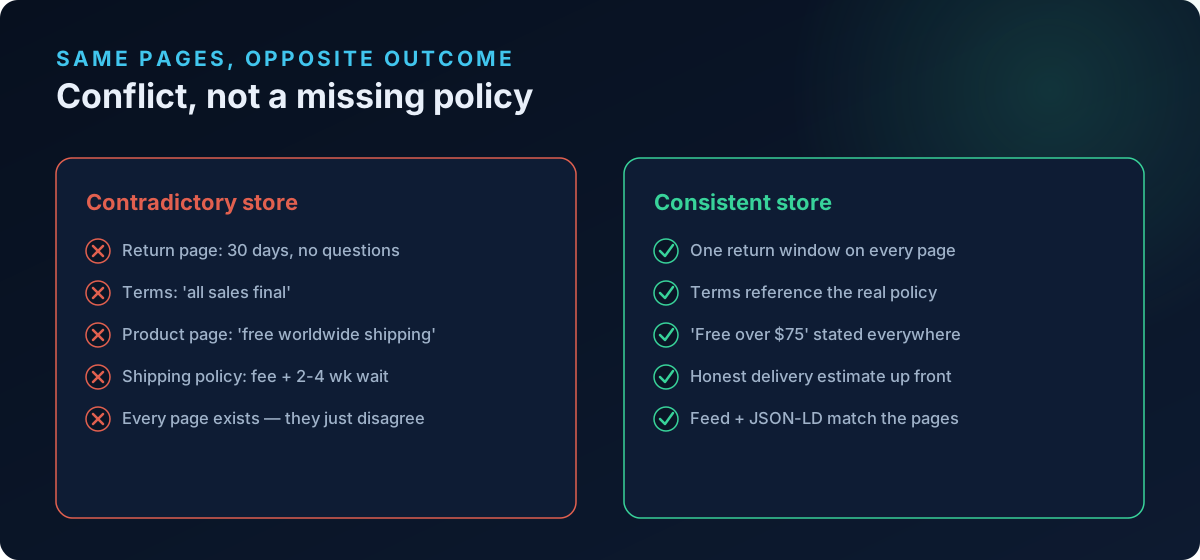
Here is the part almost nobody tells you: Google is not always failing you for a missing policy. It is failing you for policies that contradict each other across your own pages. Your return page says 30 days, your footer says "all sales final," your product page promises "free worldwide shipping," and your shipping policy quietly mentions a restocking fee and a two-to-four week wait from an overseas warehouse. Every one of those pages exists. That is exactly why the suspension feels impossible to diagnose — the problem is not absence, it is conflict.
Why contradictory policies read as misrepresentation
Google's Misrepresentation policy does not just ask "does a return policy exist?" It asks whether your business presents itself accurately, consistently, and transparently to shoppers. The policy explicitly prohibits, among other things, "failure to clearly and conspicuously disclose all related conditions before and after purchase" — a clause Google files under Omission of relevant information.
When two of your own pages say different things, one of them is, by definition, not disclosing the true condition. Google's reviewers — and increasingly its automated crawlers — treat that internal contradiction as evidence that a shopper cannot trust what your store tells them. It does not matter that you did not intend to mislead. Under the misrepresentation framework, an unreliable buying experience is the violation.
There is a second, mechanical reason this bites Shopify stores specifically. As of 2025, Google reconciles your return and shipping policies across three sources: the settings in Merchant Center, your on-page policy text, and the structured data (JSON-LD / MerchantReturnPolicy) your theme emits. Google's own return policy setup guidance stresses that these must stay consistent — in the footer, the returns page, and the feed. Product-level markup overrides organization-level rules, and Search Console settings can override both. If your pages disagree with each other, they will also disagree with your feed, and Google catches the mismatch on its next crawl.
The five contradictions that quietly get stores suspended
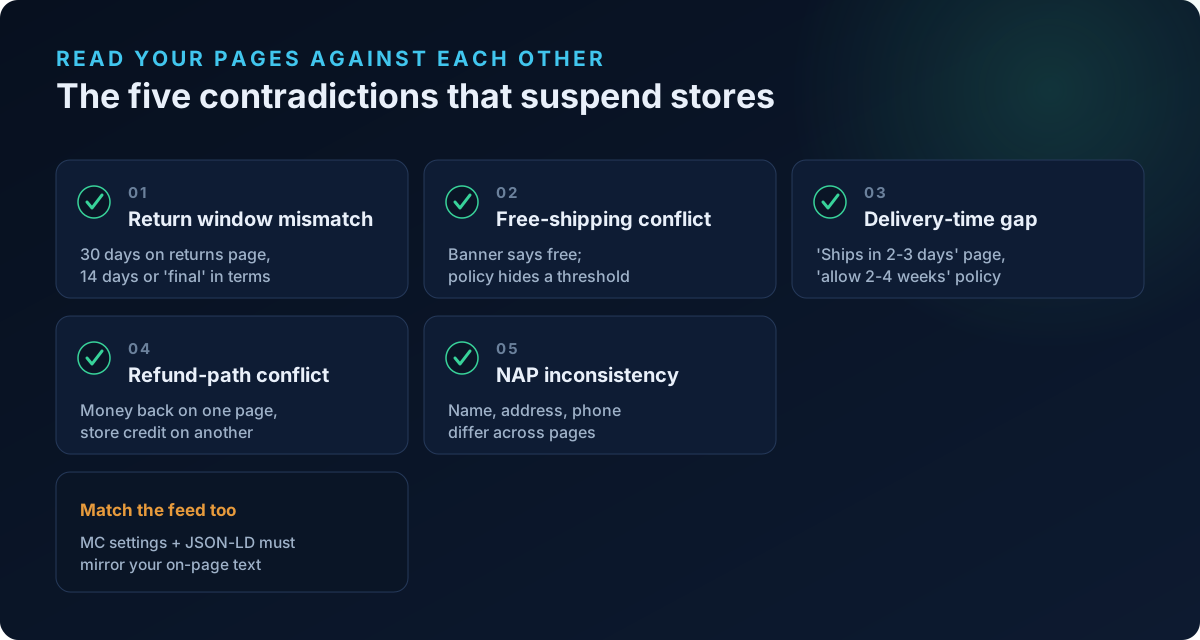
These are the conflicts we see trigger suspensions most often. Each one is invisible in a "does the page exist?" checklist — you only catch them by reading your pages against each other.
1. Return window says one thing, terms say another
The classic. Your dedicated Returns & Refunds page states "30-day returns, no questions asked." Your Terms of Service — often auto-generated or copied from a template months earlier — contains a line like "all sales are final" or "returns accepted within 14 days." Now you have three numbers (30, final, 14) that a reviewer or crawler can find in under a minute.
- Fix: Pick one true policy and make every page repeat the same window, conditions, and any fees. Delete or rewrite the boilerplate clause in your Terms so it references your real returns policy instead of contradicting it.
- Then match the feed: Update your Merchant Center return settings (and your theme's
MerchantReturnPolicystructured data) so the return window and cost are identical to the on-page text.
2. "Free shipping" on the product page, fees or minimums in the shipping policy
Your product pages and homepage banner shout "Free Shipping." Your shipping policy — the fine print — says free shipping applies only over $75, or excludes certain regions, or adds a handling fee at checkout. This maps directly to Google's Untrustworthy Promotions and Omission of relevant information concerns: a promotion the shopper cannot actually get as stated.
- Fix: Make the headline promise match the condition. If free shipping has a threshold, say "Free shipping over $75" everywhere it appears — banner, product page, and policy — not just in the fine print.
- Watch the checkout: If the visible page promises free shipping but a shipping charge appears at checkout, that is a Conditions Not Met-style mismatch between the offer and the actual purchase experience.
3. Delivery timeframe on the page vs. the real fulfillment window
The product page says "ships in 2-3 business days." The shipping policy — or a buried FAQ — admits "please allow 2-4 weeks for delivery." For dropshipping and print-on-demand stores this contradiction is nearly universal, and it is a leading cause of misrepresentation flags because it also signals a concealed fulfillment origin (see the next section).
- Fix: State the honest, end-to-end delivery estimate in the same place the shopper decides to buy. If items ship from an overseas warehouse, say so plainly; hiding it is the violation, not the warehouse itself.
4. Contradictory refund mechanics (store credit vs. money back)
One page promises a full refund to the original payment method. Another says refunds are issued only as store credit, or minus a restocking fee that is not mentioned anywhere else. Shoppers — and reviewers — read this as bait-and-switch.
- Fix: Define exactly one refund path: what is refunded, how, minus what, and when. Every page that touches refunds must describe that single path.
5. Contact and business identity that shifts between pages
Your footer shows one business name, your Terms name a different legal entity, and your contact page lists a phone number with a country code that does not match either. Google's contact-information requirements treat this as both Insufficient Contact Information and misrepresentation. Your NAP — Name, Address, Phone — must be consistent across the storefront, contact page, legal pages, and Merchant Center.
- Fix: Reconcile the business/legal name, address, and phone so they read identically everywhere, including inside Merchant Center's business information settings.
How to audit your own store in 20 minutes
You do not need special tools to start — you need to read your pages side by side and hunt for numbers and promises that disagree.
- Open every legal page at once: Return/Refund policy, Shipping policy, Terms of Service, Privacy policy, Contact, and any "About" or FAQ page.
- Extract the hard claims from each. Write down every specific number and promise: return window (days), restocking/return-shipping fees, free-shipping threshold, delivery timeframe, refund method, business name, address, phone, email.
- Line the claims up and look for disagreement. Any place two pages state a different number or a different rule for the same thing is a contradiction to fix.
- Check the product pages and banners against the policies. Promotional copy ("free shipping," "ships today," "30-day money-back guarantee") must be backed by the policy text, not undercut by it.
- Reconcile with Merchant Center and structured data. Confirm your Merchant Center shipping and return settings — and your theme's JSON-LD — match the (now consistent) on-page policies. Remember: every time you edit a policy page, you must update the feed side too, or the next crawl re-opens the discrepancy.
- Fix, then request review once — with everything resolved. Google requires all issues to be fixed before a re-review. Submitting with one contradiction still live usually means another denial. If you are recovering from a suspension, our reinstatement guide walks through the review-request sequence.
Where automated policy scanners fall short
Most "GMC readiness" checkers verify page presence: is there a return policy URL, a shipping policy URL, a contact page? That is table stakes, and it is exactly the layer that does not catch contradictions. A store can pass every presence check while its own pages quietly disagree — which is why so many merchants are baffled by a suspension when "everything is there."
Catching contradictions requires actually reading the content of each page and comparing claims against one another, against the product pages, and against the feed. This is part of what ShopFlix AI's Deep scan and its Trust & Identity layer were built to do. Beyond checking that policies exist, the Trust & Identity checks look at the business-legitimacy signals that presence-only scanners miss and that drive misrepresentation suspensions, including:
- Contradictory policy statements across your own legal pages — the exact conflicts described above.
- Concealed fulfillment origin — shipping or terms prose that admits an overseas warehouse behind a domestic-looking storefront (Omission of relevant information).
- NAP consistency — whether your business name, address, and phone match across storefront, contact, legal pages, and Merchant Center, and whether your brand name matches your legal entity.
- Brand-implied geography vs. reality — a brand implying a location it cannot back with a matching address, phone, currency, or domain.
- Registered-agent / mail-drop addresses and very new or WHOIS-masked domains, both of which draw heavier reviewer scrutiny.
The Basic scan covers your store fundamentals and policy/contact pages; the Advanced scan covers product-feed data like GTIN/MPN/brand, price and availability, and image compliance; the Deep scan adds the misrepresentation, checkout, and Trust & Identity layers on top. Contradictory policies live squarely in that top layer.
Frequently asked questions
Can conflicting policy pages really get my whole account suspended, not just a product disapproved?
Yes. A routine feed-vs-page price or availability mismatch usually causes item-level disapproval, not an account suspension. But policy contradictions fall under the Misrepresentation framework, which is an account-level policy. If Google concludes your store presents inconsistent or untrustworthy conditions to shoppers, it can suspend the entire Merchant Center account, not just the affected items.
Why did Google approve my store for months and then suspend it?
Google re-crawls and re-reviews continuously, and its automated systems and manual reviews catch things at different times. A contradiction that existed from day one can go unnoticed until a review is triggered — often after you edit a policy, add products, run a promotion, or simply get selected for a periodic audit. The conflict was always there; the review that found it is what changed.
My Terms of Service was auto-generated. Could that be the source of the conflict?
Very often, yes. Template and auto-generated Terms frequently contain generic clauses — "all sales final," a default 14-day window, a different refund method — that contradict the specific return and shipping policies you wrote yourself. Read your generated Terms line by line and rewrite any clause that disagrees with your real, customer-facing policies.
Do my Merchant Center settings need to match my on-page policies exactly?
Yes. Since 2025, Google reconciles return and shipping policies across Merchant Center settings, your on-page text, and your structured data. If your on-page return window is 30 days but your Merchant Center or JSON-LD says 14, Google may display wrong information and flag the inconsistency. Every policy edit on your site should be mirrored in Merchant Center and your theme's structured data.
How do I know which pages Google is actually reading?
Google crawls your public policy pages (usually linked in the footer), your product landing pages, and your structured data, and it reads the shipping/return settings inside Merchant Center. It does not tell you which specific line triggered the flag — the suspension notice is deliberately generic. That is why a full side-by-side audit of every page beats guessing at a single culprit.
Is it enough to just delete the contradicting page?
Deleting a page can remove a conflict, but be careful: Google also expects your store to have clear, discoverable return, shipping, refund, and contact policies. The goal is not fewer pages — it is one consistent set of claims repeated across all the pages Google requires. Reconcile the wording rather than stripping policies out.
Scan your store before Google does
Contradictory policy pages are the kind of problem you almost never spot by re-reading a single page — you only catch it by comparing every page against every other page, against your product listings, and against your feed. Before you request another Merchant Center review, run a free public scan at shopflixai.com to surface the exact conflicts hiding in your own store, or install ShopFlix AI on the Shopify App Store to run the Deep scan and Trust & Identity checks and fix them directly. Finding the contradiction yourself — before Google's reviewer does — is the difference between a clean re-review and one more denial.
Stop guessing why Google flagged your store
Run a free scan to see the exact issues Google checks for — then install the ShopFlix AI app to fix them automatically and stay approved.
0 Comments
No comments yet — share your experience or ask a question below.
Leave a comment