You registered your domain last month, built a clean Shopify store, connected Google Merchant Center, and within days got the email: "Misrepresentation of self or business." No specifics. No mention of your domain. Just a suspended account and a link to a policy page. You read it three times and still can't find the rule you supposedly broke, because your products are real, your prices are honest, and your policy pages are all there.
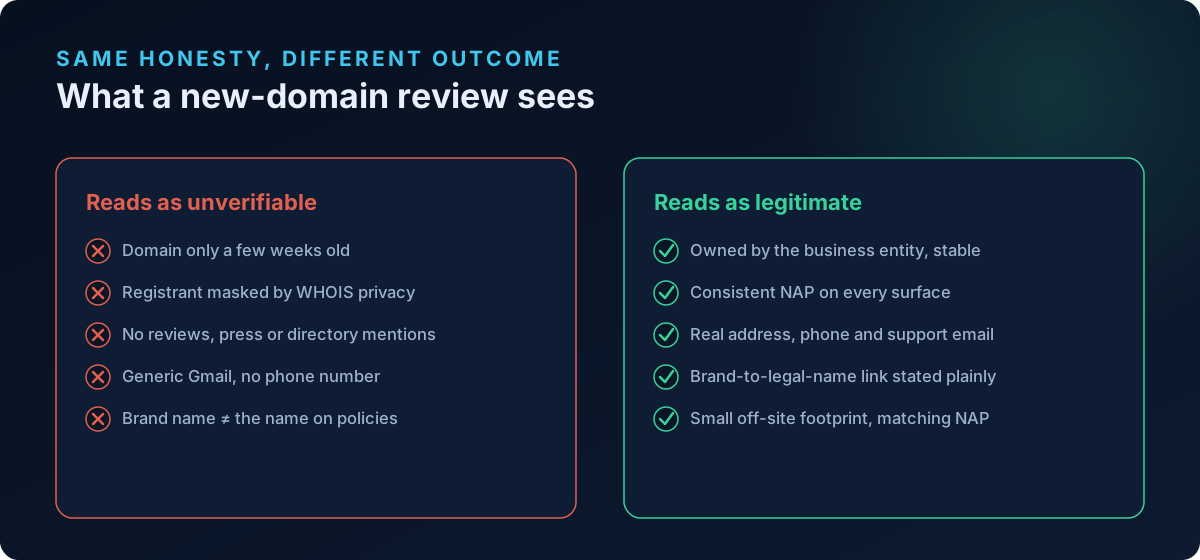
Here's the part almost nobody explains: your domain age and how your domain is registered are quietly part of the trust picture Google's reviewers assemble. A domain that is only a few weeks old, registered behind a WHOIS privacy shield, with no third-party mentions anywhere on the web, gives an automated reviewer almost nothing to verify you with. That doesn't make you a scammer. It makes you unverifiable — and on a brand-new store, unverifiable and untrustworthy look the same to a first-pass review.
Domain age is not a policy — but it shapes how hard Google looks
Let's be precise, because there's a lot of bad information out there. Google has no published rule that suspends stores for having a young domain. You will not find "domains under 90 days old are banned" anywhere in the Merchant Center Misrepresentation policy. Anyone who tells you otherwise is guessing.
What is true is subtler and more important. Google's Misrepresentation policy exists to stop merchants who "present a false identity, business name, or contact information" or who "scam users by concealing or misstating information about the business." To enforce that, the review system tries to corroborate that you are a real, consistent business. It cross-references your storefront, your contact and legal pages, your Merchant Center account data, and third-party signals across the web.
A new domain simply starves that process of evidence:
- There are no archived versions of your site, no history to compare against.
- There are few or no independent mentions — no reviews, no press, no directory listings, no social footprint tied to the domain.
- The domain registration itself is fresh and, very often, masked by WHOIS privacy, so even the registrant identity is hidden.
When the corroborating evidence is thin, the review leans harder on the signals it can see on your own site. Any inconsistency there — a mismatched business name, a missing phone number, a policy page that contradicts another — now carries far more weight than it would on an established store. That's why two stores with identical honesty can get different outcomes: the aged domain absorbs a small inconsistency; the week-old domain gets suspended for it.
The real mechanism: reduced margin for error
Think of domain age as a trust buffer, not a gate. An established domain with a web footprint has slack — Google has other ways to confirm you exist. A new domain has zero slack. Every identity signal on your own store has to be airtight, because that store is the entire body of evidence. New accounts are also where Google is most aggressive: the first Merchant Center review of a fresh account is effectively a background check, and it is the single most common moment for a misrepresentation suspension to land.
Why WHOIS privacy makes a new store harder to trust
When you register a domain, your name, address, email, and phone go into the public WHOIS record. Most registrars now enable WHOIS privacy (also sold as "domain privacy" or "ID protection") by default, replacing your details with a proxy like "Domains By Proxy" or the registrar's own privacy service. That's a reasonable choice for a personal blog. For a commerce store trying to prove it's a legitimate business, it removes one more way to confirm who you are.
There is no policy that says "you must have public WHOIS." But consider the review's point of view. It's looking at a domain that is:
- A few weeks old, and
- Registered to a masked, anonymous proxy, and
- Absent from the rest of the web.
Every one of those individually is fine. Stacked together, they read as "I cannot verify this business by any external means." The fix is not necessarily to expose your home address to the world — it's to make sure the rest of your identity is loud, consistent, and verifiable so the masked WHOIS record stops being the only data point Google has.
What to actually do about WHOIS on a new store
- Match your WHOIS registrant to your business name. If you do keep the record public (or partially public), the registered name should be your business or legal entity — not an unrelated personal name or a nickname that appears nowhere else.
- Register the domain to the same entity that owns the store and the Merchant Center account. Ownership that jumps between people and entities is a classic misrepresentation trigger.
- If you use privacy protection, compensate with strong on-site and off-site identity signals (covered below). Privacy is only a problem when it's the only thing hiding your identity.
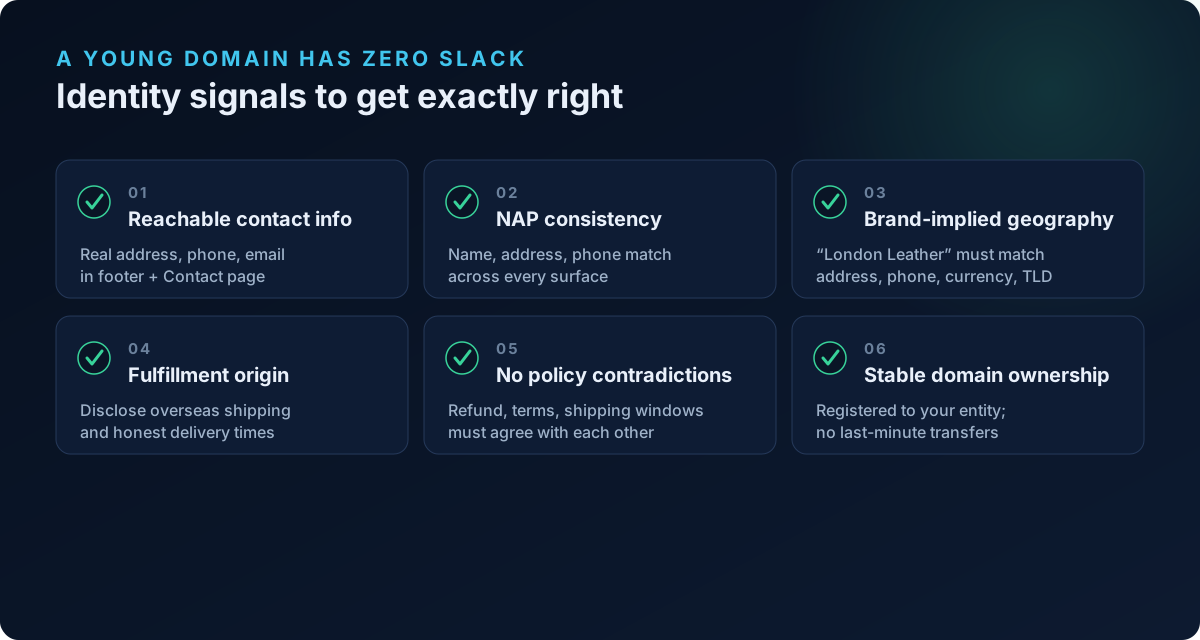
- Avoid recent domain transfers or ownership changes right before you advertise. A domain that just changed hands looks, to an automated check, a lot like a domain being repurposed to dodge a past suspension.
The identity signals a new store has to get exactly right
Because a young domain gives Google little to work with, the burden shifts entirely onto the signals you control. These are the ones new Shopify stores fail most often — and each maps to a real Merchant Center policy.
Contact information that is real and reachable
Google's Insufficient Contact Information requirements ask your online store to make contact details easy to find. In practice, aim for a genuine business address, a working phone number, and a support email (or contact form) placed in the footer and on a dedicated Contact page. A generic Gmail address and no phone number is exactly the kind of thin contact profile that tips a new-domain review toward suspension.
One trap specific to new stores: using a registered-agent or mail-drop address as your business address. Incorporation services (the kind that provide a shared corporate address for hundreds or thousands of companies) hand you an address that resolves, in Google's data, to a mass-incorporation location rather than a real place of business. That mismatch reads as concealment. If the only address you can show is a registered-agent address, understand that it lowers trust rather than raising it.
NAP consistency across every surface
NAP stands for Name, Address, Phone — and on a new store, consistency of NAP is one of the highest-leverage things you can control. Your business name, address, and phone number must match, character for character where possible, across:
- Your storefront header and footer
- Your Contact and About pages
- Your Terms, Privacy, Refund, and Shipping policy pages
- Your Merchant Center business information
- Your Google Business Profile and social profiles (if any)
- Your WHOIS record, if it's public
A common failure is the brand name versus legal entity name gap. You market as "Aurora Home" but your policies, payment descriptor, and WHOIS say "GreenLeaf Ventures LLC." That's usually legitimate — but if the connection is never stated anywhere, an automated review sees two unrelated names attached to one store and flags misrepresentation. The fix is one sentence: state on your Terms or About page that "Aurora Home is a trading name of GreenLeaf Ventures LLC."
Brand-implied geography that matches reality
If your brand name, copy, or design implies a location — "London Leather Co.", "Nordic Timber", "Made in Italy" — the rest of your identity has to back it up. A store called "London Leather" with a US phone number, prices only in USD, a .com with no UK footprint, and a WHOIS registered elsewhere is claiming a geography it can't support. Under the Misrepresentation policy this is a textbook implied-origin problem. Either align the signals (address, phone, currency, TLD) or drop the geographic implication from your branding.
Fulfillment origin you don't hide
If you dropship or fulfill from overseas, the Misrepresentation policy's Omission of relevant information clause requires you to disclose it. The specific failure mode: a storefront that presents a domestic identity while the shipping or terms prose quietly admits parcels ship from an overseas warehouse with 15-to-30-day delivery. Concealing the fulfillment origin behind a local-looking brand is exactly what "omission of relevant information" targets. Disclose shipping origin and realistic delivery times plainly on the product and shipping pages.
No contradictions between your own legal pages
Reviewers read your policy pages against each other. If your Refund policy says 30 days but your Terms say 14, or your Shipping page promises 3-day delivery while your FAQ says 3 weeks, that internal contradiction is a misrepresentation signal on its own — and on a new domain with no buffer, it can be the deciding factor. Read every legal page as a set and reconcile the numbers.
For a deeper walk-through of building these signals from scratch, see our guide on warming up a new Shopify store before you advertise.
A pre-launch checklist for a young domain
Do these before you upload a feed, not after you get suspended:
- Register the domain to your business name and entity, and keep ownership stable — no last-minute transfers.
- Decide on WHOIS deliberately. If you use privacy, make sure your on-site identity is unmistakable. If you keep it public, ensure the registrant name matches your business.
- Publish full contact details — real address (not a registered-agent mail drop), phone, and email — in the footer and on a Contact page.
- Lock NAP consistency across storefront, contact, About, all legal pages, and Merchant Center. State any brand-versus-legal-name relationship explicitly.
- Align brand-implied geography with your actual address, phone, currency, and TLD — or remove the implication.
- Disclose fulfillment origin and honest delivery times, especially if you ship from overseas.
- Reconcile every policy page so return windows, shipping times, and terms never contradict each other.
- Build a minimal off-site footprint — a Google Business Profile, real social profiles, and a couple of legitimate directory listings — all using the identical NAP.
- Verify and claim your website in Merchant Center, and complete any identity or business verification Google prompts you for.
None of this requires an aged domain or a sales history. It requires that every signal Google can see agrees with every other signal.
Where a compliance scan fits
The hard part isn't understanding these rules — it's catching the one inconsistency you can't see because you wrote the pages yourself. That's what a compliance scan is for. ShopFlix AI scans a Shopify store against the same categories Google's reviewers weigh. The Basic tier checks store fundamentals and your policy and contact pages; Advanced checks the product-feed data (GTIN/MPN/brand, price and availability, image compliance); and the Deep tier adds a Trust & Identity layer built specifically for the signals covered in this article — registered-agent and mail-drop addresses, brand-implied geography that doesn't match reality, domain age and WHOIS masking, concealed overseas fulfillment, NAP consistency, and contradictions across your legal pages. Those are exactly the business-legitimacy checks that page-presence scanners miss and that drive misrepresentation suspensions on new domains.
Frequently asked questions
Will Google reject my store just because the domain is new?
No. There is no policy that suspends stores for domain age alone. A new domain simply gives Google fewer external ways to verify you, so any inconsistency on your own store carries more weight. Get your on-site identity signals airtight and a young domain is not a problem by itself.
Do I have to turn off WHOIS privacy to get approved?
Not necessarily. WHOIS privacy is not a violation. It only becomes a liability when it's the only thing hiding your identity — a new, footprint-free domain behind a masked registrant. Compensate with strong, consistent contact info and NAP across your store and Merchant Center, and privacy protection is fine to keep.
How old should my domain be before I connect Merchant Center?
There's no magic number, and waiting alone won't fix a thin identity. Age helps only because it lets a web footprint and consistent signals accumulate. A two-week-old domain with complete contact info, consistent NAP, and a small off-site presence will outperform a year-old domain with contradictory policy pages.
My WHOIS name is different from my store name. Is that a problem?
It can be if the two are never connected anywhere. If your domain is registered to your legal entity and you trade under a brand name, state that relationship plainly on your About or Terms page ("[Brand] is a trading name of [Legal Entity]"). Reviewers flag unexplained name mismatches, not legitimate trading names.
Can I use my registered-agent or incorporation-service address as my business address?
It's risky. Those addresses resolve to shared, mass-incorporation locations in Google's data, which reads as concealment rather than a real place of business. If it's genuinely your only option, understand it weakens trust, and make every other identity signal as strong as possible to compensate.
I dropship from overseas — do I have to say so?
Yes, in substance. The Misrepresentation policy's omission-of-relevant-information clause requires you not to hide material facts like fulfillment origin and realistic delivery times. You don't have to name a supplier, but your shipping and product pages should honestly reflect where orders ship from and how long delivery takes.
Scan your store before Google does
A misrepresentation suspension on a new domain is almost always fixable, but it's far cheaper to catch the gaps before your first review than to appeal after. Run a free public scan at shopflixai.com to see which trust and identity signals your store is missing, then install ShopFlix AI on the Shopify App Store to run the Deep scan's Trust & Identity layer and fix the exact signals that decide whether a young domain passes or gets suspended.
Stop guessing why Google flagged your store
Run a free scan to see the exact issues Google checks for — then install the ShopFlix AI app to fix them automatically and stay approved.
0 Comments
No comments yet — share your experience or ask a question below.
Leave a comment